Codex MCP Setup Without the Context Tax
Codex MCP setup in config.toml: where the file really lives, what each server costs in tokens before you type, and how to fix the ten-second timeout.
Codex CLI connects to MCP servers with one command: codex mcp add NAME -- COMMAND for a local stdio server, or --url for a remote one. Both write an [mcp_servers.NAME] table into ~/.codex/config.toml, per OpenAI's Codex docs. The setup takes a minute. What it costs you in context every turn is the part nobody measures.
Updated September 25, 2026 · by the AITerm team
tokens of preload on our own repo after cutting six connected servers down to three
default startup timeout per server, and the single most common reason a working server never appears
tokens measured for a full GitHub MCP server, for tools you mostly do not call
Key takeaways
codex mcp add NAME -- COMMANDfor stdio,codex mcp add NAME --url URLfor streamable HTTP. Both write the same TOML you could have typed.- The config lives at
~/.codex/config.toml, and a project-local.codex/config.tomlworks too, but only in a repository you marked trusted. - You pay for registered tools, not called tools. Every server's schema sits in context on every turn.
- Two timeouts, both per server:
startup_timeout_secdefaults to 10,tool_timeout_secdefaults to 60. - Sharing a server with Claude Code means duplicating config, not sharing it. TOML on one side, JSON on the other.
Look, the setup part of this is genuinely easy, and that is why every guide stops there. Run one command, restart, see the tools. Done.
Here's the thing. We ran six MCP servers against the aiterm repository for most of two months and spent that time quietly blaming the model for picking the wrong tool. Turns out the model was fine. We had handed it a menu it could not read.
Can Codex use MCP?
Yes, fully, in both directions. Codex CLI is an MCP client that connects to local stdio servers and to remote streamable HTTP servers, and it can also run as an MCP server itself so another agent can call it as a tool.
Two transports, two shapes. A stdio server is a process Codex launches on your machine and talks to over standard input and output. A remote server lives at a URL, with nothing to install and nothing to keep running.
So the command is the same either way, and the separator matters.
# local stdio server: everything after -- is the launch command
codex mcp add context7 -- npx -y @upstash/context7-mcp

# remote streamable HTTP server
codex mcp add internal --url https://mcp.example.com/mcp

# with environment variables the server needs
codex mcp add pg --env DATABASE_URL=postgres://localhost/dev -- npx -y @pg/mcp

# check what actually loaded
codex mcp list
codex mcp get context7 --json
The -- separator is where people lose an afternoon. Everything before it belongs to Codex, everything after it belongs to your server. Put --env after the separator and Codex hands it to npx, which has no idea what you meant.
And yes, codex mcp list is worth running even when you are sure. It reports the transport, the status and the authentication state, which is three questions answered before you start guessing.
Where Codex actually keeps the config
Codex stores MCP servers in config.toml, at ~/.codex/config.toml by default, as [mcp_servers.NAME] tables. The codex mcp add command is a TOML writer with a nicer face.
Here's the thing the top-ranking setup guides skip. There is a second location: a project-local .codex/config.toml that scopes servers to a single repository, and Codex only loads it for projects you have marked as trusted. If a server only makes sense inside one codebase, that is where it belongs, not in your home directory where it taxes every other session.
# ~/.codex/config.toml

[mcp_servers.context7]
command = "npx"
args = ["-y", "@upstash/context7-mcp"]
startup_timeout_sec = 25

[mcp_servers.internal]
url = "https://mcp.example.com/mcp"
bearer_token_env_var = "INTERNAL_MCP_TOKEN"
tool_timeout_sec = 120

[mcp_servers.heavy_thing]
command = "npx"
args = ["-y", "@vendor/big-mcp"]
enabled = false   # keeps the line, costs zero context
One rule about secrets. Keep bearer token values out of the file: use OAuth where the server supports it, or point bearer_token_env_var at an environment variable so Codex reads the credential from the process environment instead of from a file you might commit.
| Key | Applies to | What it does |
|---|---|---|
command | stdio | The binary Codex launches. Usually npx, uvx, node or an absolute path. |
args | stdio | Array of arguments. Everything you put after -- on the CLI lands here. |
env | stdio | Variables handed to the child process. Not a secret store: the file is plain text. |
url | HTTP | Streamable HTTP endpoint. Mutually exclusive with command. |
bearer_token_env_var | HTTP | Name of the env var holding the token. Store the name here, never the token. |
startup_timeout_sec | both | Seconds to wait for the server to come up. Default 10. |
tool_timeout_sec | both | Seconds a single tool call may run. Default 60. |
enabled | both | Set false to keep the entry and stop loading it. No CLI equivalent yet. |
In practice you touch four of these and never think about the rest. The two timeout keys are the ones that turn a broken afternoon into a two-line fix, and we get to them below.
What does an MCP server cost you per turn?
More than the setup guides admit. Every connected server loads its tool schemas into the context window before your first prompt, and they sit there on every turn whether you call a tool or not.
The numbers people have measured are not small. A full GitHub MCP server has been measured around 55,000 tokens on its own. Multi-server setups have been clocked past 70,000 tokens of preload before anyone typed anything. Set that against an effective Codex budget closer to 258,000 tokens than to the figure on the marketing page, and a quarter of your session is gone to a menu.
The line that stuck with us, from a write-up on exactly this: you pay for registered tools, not called tools.
/status at the top of a fresh session on the aiterm repository, before and after the cut. Round numbers on purpose.So here is the position we will defend, and it is not the popular one. For a coding agent, MCP is a liability by default and an asset only by exception. Most of what teams wire up through MCP is a shell command wearing a costume.
The clearest case is the GitHub server. You are spending tens of thousands of tokens so the agent can do what gh pr list already does, in a shell it already has, with output it already parses. We deleted ours and nothing got worse. Our pull request handling got faster, because the agent stopped browsing a tool catalog to find the thing it could have typed.
You're probably thinking this is an argument against MCP in general. It is not. It is an argument against installing a server for something your agent can already do in a terminal.
Which servers earn their context budget?
Three, for us, on a repository that is roughly 8 MB of Swift plus a static site. The test we apply is narrow: does this server give the agent something it genuinely cannot get from a shell command or a file read?
Turns out almost nothing passes it.
Documentation lookup
Context7 is the one most people install first, and it is the right first install. Current library docs are the thing a model genuinely cannot produce from training weights, and a wrong API signature costs more than the schema does. codex mcp add context7 -- npx -y @upstash/context7-mcp and you are done.
A database the agent must not guess at
Read-only schema and query access against a dev database. This passes the test because the alternative is the agent inventing column names from a migration file that drifted six months ago. Point it at a dev instance, never production, and scope it project-local so it does not load in unrelated sessions.
One internal server, ours
A small streamable HTTP server exposing our build and release metadata. It earns its place because the data lives behind an internal API and nowhere on disk. Four tools, a schema you could read aloud in thirty seconds, and it costs us under a thousand tokens.
What we cut, and why
GitHub, because gh exists. A filesystem server, because Codex reads files natively. A browser automation server, because we used it twice in two months and it was the single most expensive schema in the list. Three deletions, most of the 25,000 tokens we got back.
Honestly, the hardest part of that cut was admitting the browser server had been decorative since the week we installed it. It is easy to keep a tool because configuring it took effort. That is a sunk cost, and the agent pays interest on it every turn.
Opinion. Three servers is a ceiling, not a target. Past four we measured worse tool selection, not just a smaller window: the agent started reaching for a catalog entry when a two-word shell command was right there. If you want to feel this yourself, disable everything, work for a day, then add back only what you actually missed.
Why does your MCP server time out?
Because Codex gives it 10 seconds to start and you are running npx -y against a package that is not cached yet. That is the default startup_timeout_sec, and it is the single most common reason a correctly configured server never shows up in codex mcp list.
The second timeout is separate and bites later. Each tool call gets 60 seconds by default, controlled by tool_timeout_sec. A server that queries a slow internal API will connect perfectly, list its tools perfectly, then fail on the first call that matters.
[mcp_servers.slow_thing]
command = "uvx"
args = ["some-heavy-mcp"]
startup_timeout_sec = 45    # default is 10
tool_timeout_sec = 180      # default is 60
Both keys go inside the server's own table. Put startup_timeout_sec at the wrong scope and Codex answers with an invalid transport error, which is an open issue on the repository and a message that tells you nothing about what you actually did wrong. We lost twenty minutes to it. Learn from that instead.
Fair question: why not just raise both to something enormous and forget about it? Because a startup timeout is the only thing standing between you and a session that hangs on a server whose package was unpublished last week. Raise it to what the server needs, measured once, and leave it there.
In practice one habit removes the whole class of problem for stdio servers: pin the package and pre-install it, so npx resolves from cache instead of the network. A server that starts in 400 ms never argues with a 10 second budget.
Remote servers, OAuth and the flag you still need
Remote streamable HTTP servers work, and they are where the rough edges live. Codex supports OAuth 2.0 with PKCE for them: it opens a browser for authorization and stores the resulting credentials in the system keyring, with a file fallback.
Here's the part that catches people. The OAuth flow is gated behind a feature flag. You enable the Rust MCP client, restart, then run codex mcp login NAME to authenticate. Without the flag, an OAuth-backed server simply never completes its handshake and the error does not point at the flag.
# ~/.codex/config.toml
experimental_use_rmcp_client = true

# then, once per server
codex mcp login internal
codex mcp list        # check the auth column, not just the status
Note the name: experimental_use_rmcp_client is deprecated in favour of a [features].rmcp_client setting, and both spellings are floating around in guides written weeks apart. Check which one your version accepts before assuming your config is wrong.
Two known failure modes worth knowing about, both tracked as open issues. Token refresh has omitted the RFC 8707 resource parameter, which breaks authenticated servers once the access token expires rather than at login. And the client has reused an invalidated streamable HTTP session after a login or restart, which looks exactly like a server outage from where you sit.
The short version: if a remote server worked this morning and returns authorization errors this afternoon, suspect the refresh before you suspect the server. Log out, log back in, and note how long the working window was.
One server, two agents
You can point Codex and Claude Code at the same MCP server, and we do. The server does not care who connected: it speaks MCP, and a client is a client.
And yes, that is the whole good news. What is not shared is any of the configuration, which is the confusion nobody on the first page of results resolves, so here it is side by side.
| Codex | Claude Code | |
|---|---|---|
| Format | TOML, [mcp_servers.NAME] | JSON, mcpServers object |
| File | ~/.codex/config.toml | .mcp.json or ~/.claude.json |
| Project scoping | Project .codex/config.toml, trusted repos only | Three scopes: local, project, user |
| Output cap | None exposed | 25,000 tokens, spills to a file |
| Startup timeout | startup_timeout_sec, default 10 | MCP_TIMEOUT, no default |
| Disable without deleting | enabled = false, hand edit | Scope removal or claude mcp remove |
So a stdio server shared between both agents means declaring the same command and args twice, in two formats. Annoying, and honest. In practice you commit both files, and a drift between them becomes a diff instead of a mystery.
That output cap in the right-hand column is the difference that matters most in daily use. Claude Code caps MCP tool output at 25,000 tokens by default and writes anything larger to a file it references by path. Codex exposes no such ceiling, so one badly behaved tool result can take a chunk of your window with no warning. Point both agents at a new server and watch Codex first.
If you are weighing the two agents more broadly rather than just their MCP support, we wrote that up separately in Codex vs Claude Code. The MCP gap is real but it is not the deciding factor for most people.
Turn a server off without deleting it
Set enabled = false in its table. That is the whole mechanism, and it is worth knowing because the obvious alternative loses work.
Look, there is no codex mcp enable or codex mcp disable subcommand. It is an open feature request, and until it lands, editing the TOML is the supported route. codex mcp remove exists but it deletes the entry, which means rebuilding the command, the args and the env next time you want it back.
And yes, we keep four disabled entries in our config permanently. They document what we tried, they cost nothing, and turning one on for an afternoon is a one-word edit rather than an archaeology session.
Tip. Leave a comment above each disabled block saying why you turned it off and what would justify turning it back on. Three months later that comment is the only thing standing between you and reinstalling a 55,000 token server because you forgot it was a bad idea the first time.
The audit we run monthly
Four steps, fifteen minutes, once a month. We started doing it after the six-server period, and it has paid for itself every time.
Start a fresh session on your main repository and read the context figure before typing anything. That number is your preload, and it is the only honest measurement of what your server list costs. Ours was around 34,000 tokens. We assumed it was closer to 8,000.
Then run codex mcp list --json and read it as a bill rather than an inventory. Honestly, that reframing does most of the work on its own. For each server, answer one question out loud: what can this do that a shell command cannot? A server without a clean answer gets enabled = false, not a discussion.
Third, check what is still running. Stdio MCP servers are child processes, and they do not always exit cleanly when a session dies badly. This is where we found the thing we did not expect: orphaned server processes from sessions we had closed hours earlier, still holding memory, occasionally still holding a port.
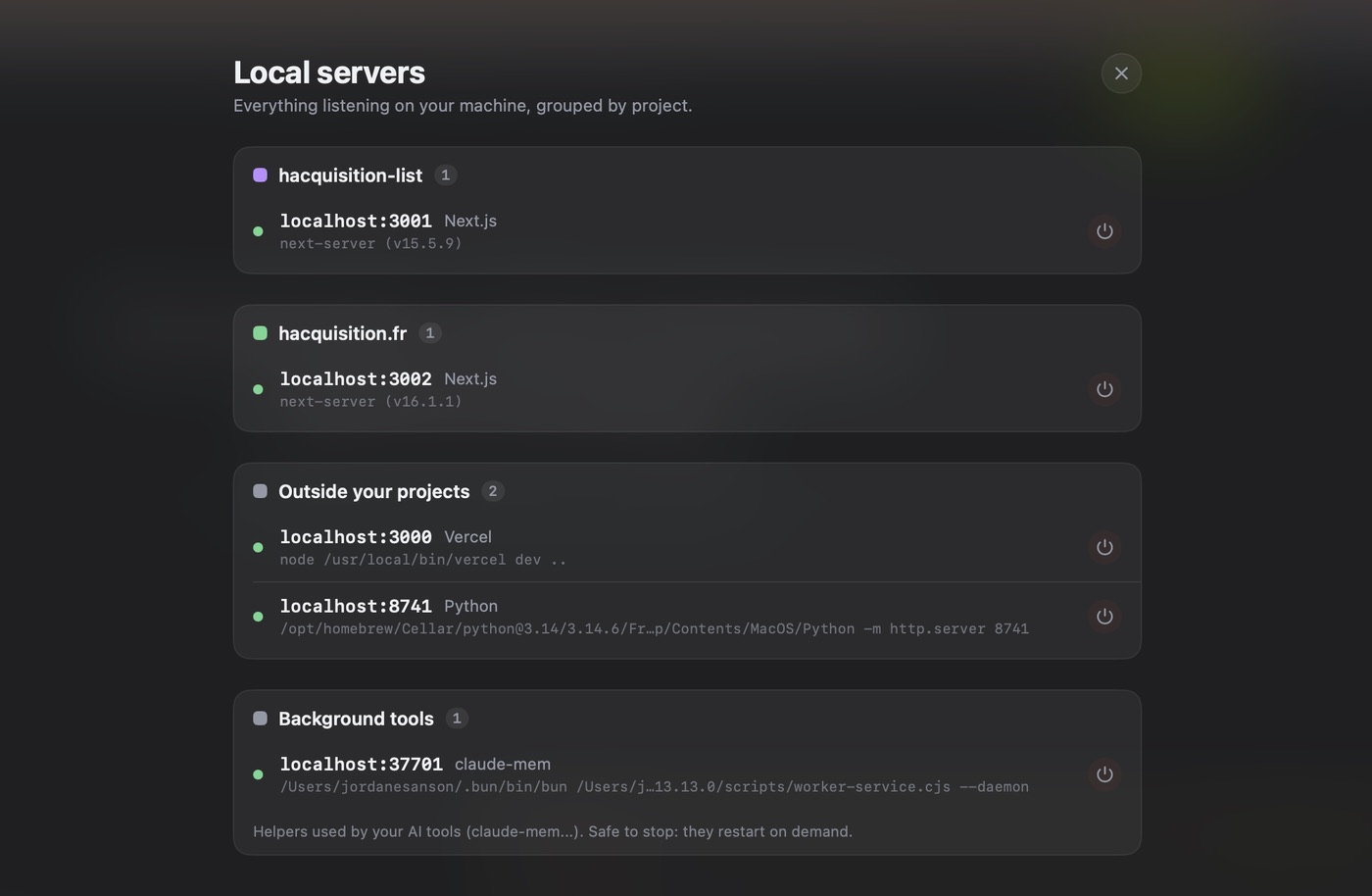
Fourth, move anything repository-specific out of your home config and into that project's .codex/config.toml. A database server for one codebase has no business loading in the twelve other sessions you open that week.
In practice the whole audit is subtraction. We have never finished one by adding a server.
Where this lands when you run more than one agent
All of the above gets more expensive the moment you are piloting several agents at once, which is the normal case now rather than the exotic one. In our anonymous daily ping, the median sits around three simultaneous agent sessions per user.
Three sessions means three sets of MCP servers starting, three preloads, and three sets of child processes that may or may not exit when you close a pane. A configuration mistake that costs 25,000 tokens once costs you 75,000 across a working afternoon.
That is the friction AITerm is built against. Native macOS panes with a live state per agent session, so a server that failed to start is visible instead of inferred from a missing tool. The Local servers panel above, so orphaned stdio processes have somewhere to show up. Isolated worktrees, so two agents holding the same project-local config do not fight over the files underneath it. Twenty panes streaming agent output sit around 140 MB of resident memory on an M2 Air, with keystroke latency under 8 ms.
None of that makes your MCP setup smaller. It makes it visible, which is the step before you can cut it.
The short version: add the server with one command, measure what it costs before your first prompt, and delete anything a shell command already does. Now go read your own preload number.
Going further
PILLAR
The Codex CLI guide
Install, sandbox modes, approvals, AGENTS.md, profiles and the rest of config.toml around the MCP tables.
SKILLS
Skills that earn their context
The same budget argument applied to skills, which are usually the cheaper answer to what you wanted a server for.
COMPARE
We run both daily
Where each agent is worth the seat, beyond which one has the better MCP client.
COST
What Codex really costs
Preload tokens are billed like any other tokens. This is the piece that turns them into a monthly number.
Sources
- Model Context Protocol, OpenAI Codex docs:
codex mcp addfor stdio and--urlservers, the[mcp_servers.NAME]TOML table,--bearer-token-env-var, andcodex mcp list/getwith--json. - Config basics, OpenAI Codex docs:
~/.codex/config.tomlas the default location, and the project-local.codex/config.tomlloaded only for trusted projects. - Configuration reference, OpenAI Codex docs:
startup_timeout_secdefault 10 seconds,tool_timeout_secdefault 60 seconds, per server. - Issue #29396, invalid transport error on
startup_timeout_sec, openai/codex: the misleading error when the key sits at the wrong scope. - Issue #6995, replace
experimental_use_rmcp_clientwith[features].rmcp_client, openai/codex: the flag that gates OAuth and streamable HTTP, and its deprecation. - Issue #16439, add
codex mcp enable|disablesubcommands, openai/codex: confirms no CLI toggle exists and that editingenabled = true|falsein TOML is the workaround. - Issue #33403, MCP OAuth refresh omits the RFC 8707 resource parameter, openai/codex: authenticated servers breaking after access token expiry rather than at login.
- Issue #46158, invalid streamable HTTP session reused after OAuth login or restart, openai/codex.
- OAuth authentication for MCP, DeepWiki index of openai/codex: authorization code flow with PKCE, browser handoff, credentials stored in the system keyring with a file fallback.
- Connect Claude Code to tools via MCP, Anthropic docs: the
.mcp.jsonformat, local, project and user scopes,MCP_TIMEOUT, andMAX_MCP_OUTPUT_TOKENSdefaulting to 25,000 tokens with larger results spilled to a file. - Stop installing every MCP server, the context window cost, Metablogue, 2026: the GitHub MCP server measured around 55,000 tokens, multi-server preloads past 70,000, and the "you pay for registered tools, not called tools" framing.
- mcp-context-cost, GitHub: an auditing tool that measures what a given MCP configuration costs in context tokens, diffs a change and gates it in CI.
- Issue #32806, effective context budget, openai/codex: the roughly 258,000 effective token figure used here for comparison.
Frequently asked questions
Can Codex use MCP?
Yes. Codex CLI is a full MCP client and has been since the Rust rewrite. It connects to local stdio servers, which it launches as child processes, and to remote streamable HTTP servers behind a URL. Add one with codex mcp add NAME -- COMMAND ARGS for stdio, or codex mcp add NAME --url https://host/mcp for HTTP. Both write an [mcp_servers.NAME] table into ~/.codex/config.toml, which you can also edit by hand. Codex can run as an MCP server too, so another agent can call it as a tool.
How do you add an MCP server in the Codex app?
In the Codex desktop app, open Settings, go to Plugins, then MCPs, click Add at the top right and pick Add MCP server. Fill in the connection details, save, then complete the authentication or restart prompt if the server asks for one. The app and the CLI read separate surfaces in practice, so a server you added in the terminal does not always appear in the app until you point the app at the same config. The reliable route is to write the [mcp_servers.NAME] table once in ~/.codex/config.toml and restart both.
Where is the Codex MCP config file?
Codex keeps MCP servers in config.toml, by default at ~/.codex/config.toml, as [mcp_servers.NAME] tables. You can also scope servers to a single repository with a project-local .codex/config.toml, which Codex only loads for projects you have marked as trusted. That second file is the one most setup guides skip, and it is the right place for a server that only makes sense inside one codebase. Run codex mcp list to see what actually loaded, and add --json if you want to diff it in CI.
Why does my Codex MCP server time out?
Two different timeouts, two different fixes. Codex gives a server 10 seconds to start by default, which a server that downloads a package on first launch or loads a large tool schema will blow through. Raise it with startup_timeout_sec in that server's table. Each tool call then gets 60 seconds by default, which is the one that bites on slow API calls, and tool_timeout_sec raises it. Set both inside [mcp_servers.NAME], not at the top level: putting startup_timeout_sec in the wrong scope produces an invalid transport error rather than a useful message.
How many MCP servers should you connect to Codex?
Fewer than you want to. Every connected server loads its tool schemas into context before your first prompt, on every turn, whether or not you call a single tool. Community measurements put a full GitHub MCP server around 55,000 tokens on its own, and multi-server setups past 70,000 before anyone types anything, against an effective Codex budget nearer 258,000 tokens than the advertised number. We run three on our own repository. Past four, we measured worse tool selection, not just a smaller window.
Can Codex and Claude Code use the same MCP server?
Yes, and it is the setup we run, but nothing is shared automatically. The server process itself is agent agnostic: it speaks MCP, it does not care who connected. What is not portable is the configuration. Codex reads TOML tables at [mcp_servers.NAME] in ~/.codex/config.toml, Claude Code reads JSON under mcpServers in .mcp.json or ~/.claude.json, with scopes Codex has no equivalent for. For a stdio server you declare the same command and args twice. Keep both files in version control so the duplication stays honest.
How do you disable a Codex MCP server without deleting it?
Set enabled = false in that server's table in config.toml. There is no codex mcp enable or codex mcp disable subcommand yet: it is an open feature request on the repository, and editing the TOML is the supported workaround. Use it rather than codex mcp remove when the server is occasionally useful, because remove deletes the entry and you rebuild it from memory next time. A disabled server costs you nothing in context, which is the whole point of keeping the line around.
Is Codex MCP support better than Claude Code's?
Claude Code's is more mature, and the gap is in the guardrails rather than the protocol. Claude Code caps MCP tool output at 25,000 tokens by default and spills anything larger to a file instead of into your context, exposes per-server timeouts in config, and has three installation scopes so a server can be local, shared through the repository, or global. Codex gives you one TOML table, two timeout keys and an OAuth path still gated behind a feature flag. Codex MCP works. It just assumes you know what you are doing.