Claude Code Remote Control, Steer Agents From Your Phone
How to use Claude Code Remote Control: the three ways to start it, connecting from your phone, fixes for every error, what it stores, and when SSH wins.
To use Claude Code Remote Control, sign in with a claude.ai account, type /remote-control in a running session (or start one with claude --remote-control), then scan the QR code with the Claude app. Your phone becomes a window into the session. The code, the files and the agent stay on your machine.
Updated November 16, 2026 · by the AITerm team
concurrent sessions a single claude remote-control server hosts by default, per Anthropic's docs
of network outage before server mode gives up and exits. Interactive sessions keep retrying instead
to bring stopped server sessions back with claude remote-control --continue before they are gone
Key takeaways
- Three ways in:
/remote-controlinside a session,claude --remote-controlfor a new one,claude remote-controlfor a server that hosts many. - It needs a claude.ai login on Pro, Max, Ultra, Team or Enterprise. An API key, Bedrock or a custom
ANTHROPIC_BASE_URLturns it off. - Execution stays local, but the transcript is stored on Anthropic's servers while you are connected. Early coverage said otherwise.
- Most "not working" reports trace back to auth, an env variable or WSL2 networking. The error text names the culprit.
- Use it to approve and unblock. Coding from a phone keyboard is a demo, not a workflow.
How do you use Claude Code Remote Control?
Claude Code Remote Control connects the Claude app on iOS or Android, or any browser at claude.ai/code, to a Claude Code session that keeps running on your own computer. At AITerm, where we build a native macOS workspace for piloting coding agents, we use it the way Anthropic designed it: start the work at the desk, then approve, answer and redirect from the phone.
Anthropic announced it in late February 2026 as a research preview for Max subscribers, per Gigazine's report of February 25. It now ships to every paid plan. You pick one of three entry points depending on where you are:
Already in a session
Type /remote-control or /rc. The conversation history comes along. Run it again later to see the URL and QR code, or to disconnect.
Starting fresh
claude --remote-control "Auth refactor" gives you a normal terminal session that the phone can also drive. You keep typing locally.
Server mode
claude remote-control (alias claude rc) waits for remote connections and can host many sessions. No local chat. Press space for the QR code.
Here's the server-mode version we actually run before leaving the desk:
# once: sign in with claude.ai, not an API key
claude auth login

# in the repo: one worktree per session started from the phone
cd ~/code/shop
claude remote-control --name "shop" --spawn worktree --permission-mode acceptEdits

# press space to show the QR code, w to switch same-dir / worktree
# Ctrl+C stops the server. claude remote-control --continue brings it back.
The first run asks Enable Remote Control? (y/n) once. In a folder you have not trusted yet, it also asks Trust <directory>? [y/N]. The VS Code extension and the Claude Desktop app take the same /remote-control command, but VS Code shows no QR code: open the session from the indicator in the prompt box footer instead.
How can I control a Claude Code session from my phone?
You control a Claude Code session from your phone by starting Remote Control on your computer and opening that session in the Claude mobile app: scan the QR code Claude Code displays, or tap Code in the app and pick the session with the green dot. AITerm users get a second route, AITerm Remote, which serves every agent session on the Mac to the phone over the local network.
Concretely, there are three doors into the same session:
- The QR code. It opens the session straight in the Claude app. With
claude remote-control, the spacebar toggles it. - The session list. In the app, tap Code. Remote Control sessions show a computer icon with a green status dot when they are online.
- The URL. Any browser on any device. It lands on claude.ai/code.
No app yet? Type /mobile inside Claude Code and it shows a QR code that opens the right app store.
Turn on push before you leave. Run /config and enable Push when actions required (permission prompts and questions) and, if you want them, Push when Claude decides. If /config says No mobile registered, open the Claude app once so it refreshes its push token. On iOS, Focus modes can swallow the push. On Android, battery optimization can delay it.
One detail we like: Claude Code skips the push while you are typing in the connected terminal. Set CLAUDE_CLIENT_PRESENCE_FILE to a marker file and it also stays quiet whenever that file exists, so a screen-lock script can tell it when you are actually at the desk. Back at the desk, the terminal takes over that job: we compared how Ghostty, iTerm2, kitty, Warp and cmux flag a waiting session in our best terminal for Claude Code test.
What do you need before Remote Control works?
The short version: a claude.ai login on a paid plan, and nothing in your setup that routes Claude Code away from api.anthropic.com. Turns out the second half is where most people get stuck.
Pro, Max, Ultra, Team, Enterprise
No API keys. On Team and Enterprise, an Owner enables the toggle in Claude Code admin settings. It is off by default there.
A full claude.ai sign-in
A token from claude setup-token or CLAUDE_CODE_OAUTH_TOKEN can only make model requests. It cannot open a remote session.
Straight to Anthropic
Bedrock, Google Cloud, Microsoft Foundry, an LLM gateway or a custom ANTHROPIC_BASE_URL all disable it.
Feature flags reachable
CLAUDE_CODE_DISABLE_ or CLAUDE_CODE_DISABLE_ turns it off. Check your shell and the env block of settings.json.
Honestly, the env block is the sneaky one. A privacy setting you added months ago in ~/.claude/settings.json keeps working silently, and Remote Control just refuses to start. Run claude doctor: it lists which eligibility check failed.
Should you turn on Remote Control for every session?
Anthropic offers auto-connect: run /config and set Enable Remote Control for all sessions to true, or put "remoteControlAtStartup": true in your user ~/.claude/settings.json. A checked-in project file can only switch it off, never on, which is a sensible guard.
Our take: leave auto-connect off. Google's AI Overview and NetworkChuck's viral clip both tell you to flip it. We don't. Each interactive process then registers its own remote session, your phone list fills with names like myhost-graceful-unicorn, and every transcript sits on Anthropic's servers, even for sessions you never open on the phone. Type /rc on the two sessions you will actually watch from the couch. That's it.
If you run several agents, server mode beats auto-connect anyway. One process, many sessions, and you choose how they share the repo:
--spawn same-dir: every session works in the current folder. Fast to start, and two agents can edit the same file.--spawn worktree: each new session gets its own git worktree. This is the one we use.--spawn session: exactly one session, extra connections are refused.
Cap the count with --capacity (32 by default). The parallel setup behind those worktrees, and how to tell which agent is stuck, is in our guide to running multiple AI coding agents.
What can you actually do from the phone?
More than early reviews suggested. The phone sees the conversation as it happens, the subagents and workflows running in the background, and a diff pane when the folder is a git repo. You can attach a photo or a file, and Claude Code downloads it to your machine as an @ reference.
Slash commands are split. These work from mobile and web:
# text-output commands
/compact   /clear   /context   /usage   /recap   /exit

# pass the value as an argument, there is no picker on the phone
/model sonnet
/effort high
/rename auth-refactor
/config key=value

# terminal only: /plugin, /resume
Permission prompts and AskUserQuestion questions stay open until you answer them, from either side. Other forwarded dialogs close after five minutes with their no-action default, a delay you can change with the dialogExpiry setting.
Approve, don't code. Look, reviewing a 400-line diff on a 6-inch screen is productivity theater. The phone is for the three things that block an agent: a permission prompt, a question, a wrong direction. Answer those in ten seconds and let the agent do the typing.
Why is Claude Code Remote Control not working?
Claude Code Remote Control usually fails for one of five reasons: an API key or long-lived token overriding the claude.ai login, a gateway or cloud provider in front of the Anthropic API, an environment variable that blocks feature flags, an organization policy, or a network that blocks outbound port 443. Each prints its own message, so match the text first.
| Message starts with | Real cause | Fix |
|---|---|---|
| "requires a claude.ai subscription" | Signed out, or ANTHROPIC_API_KEY, ANTHROPIC_AUTH_TOKEN or apiKeyHelper wins | claude auth login, then remove the named variable |
| "requires a full-scope login token" | Token from claude setup-token | claude auth login with a normal session |
| "isn't enabled for this account" | Cached entitlements after a plan change | claude auth logout, login, update, then claude doctor |
| "requires feature-flag evaluation" | A variable that disables feature flags | Unset it in the shell and in settings.json |
| "only available when using Claude via api.anthropic.com" | Bedrock, Vertex, Foundry or a custom base URL | Unset the named variable, restart |
| "disabled by your organization's policy" | Owner toggle off, custom roles, HIPAA or Zero Data Retention | Ask an Owner. ZDR and HIPAA orgs cannot enable it |
| "Remote credentials fetch failed" | Proxy or firewall on outbound 443 | claude --remote-control --debug-file claude-debug.log, search code-session |
Source: Claude Code docs, Remote Control troubleshooting, read November 16, 2026.
Two failures print nothing useful. On Windows, a March 2026 GitHub issue (#30473) describes a phone that connected on the home Wi-Fi and failed from any other network while Claude Code ran inside WSL2. A commenter confirmed that the native Windows binary worked. The issue was closed for inactivity with no fix.
The other one is the green "active" status that lies. At launch, the top comment on the Hacker News thread (544 points, 313 comments) called the feature "an extremely clunky and buggy prerelease", and a run of GitHub reports describes messages sent from the phone that never reached the CLI. If the status says connected and nothing happens, run /remote-control in the terminal to reconnect, and update Claude Code before anything else.
What happens when the laptop sleeps or the terminal closes?
The phone is a window, so the session lives exactly as long as the claude process on your machine. Sleep pauses it, and it reconnects on wake. Close the terminal and it goes offline until you bring it back.
What surprised us is how many separate clocks decide whether it comes back on its own. Here they are side by side, from the official docs:
The orange bar is the one that bites. An interactive session retries for as long as an outage lasts, but a claude remote-control server on a laptop that loses Wi-Fi for a quarter of an hour exits on its own. When you get back, run it again in the same folder within about four hours:
claude remote-control                       # every session the server was serving
claude remote-control --continue            # only the one it started with
claude remote-control --session-id <id>     # id = the part of the claude.ai/code URL after /code/

# sessions started with --remote-control or /rc come back with
claude --continue    # or claude --resume
Running Claude Code on a remote box over SSH? Anthropic's own advice is to start it inside tmux or screen so the process survives your disconnect. Our tmux and Claude Code guide has the config and what survives a detach, a sleep or a reboot.
Is Claude Code Remote Control secure?
Claude Code Remote Control opens no inbound port: your machine makes outbound HTTPS requests to the Anthropic API, which relays messages to your phone over TLS using several short-lived, single-purpose credentials. Code and files never leave your machine. The session transcript does: Anthropic stores it on its servers while Remote Control is connected, under its data usage policy.
That last sentence matters, because February's coverage said something else. Gigazine's launch report described the sessions as end-to-end encrypted, with Anthropic never seeing the code. The current docs describe a relay that keeps your messages, Claude's answers and the tool activity so the conversation syncs across devices and survives a network drop. Tool activity can include what Claude read from your files.
Trusted Devices
Beta. Each phone or browser enrolls, and steering a session needs a sign-in under 18 hours old, refreshed with Face ID, Touch ID or a passkey. Pro, Max and Ultra users turn it on themselves.
A hard off switch
The disableRemoteControl setting turns it off on a machine, independent of the org toggle. Useful on a client's laptop.
Share links
If a session has a share link, /resume or /teleport disconnect Remote Control, so people with the link never see the next conversation.
Our rule of thumb: if you would not paste the repo into a claude.ai chat, don't connect its session to your phone. Organizations on Zero Data Retention or the HIPAA configuration already get that answer for free, because they can't enable it.
Remote Control, Channels, Dispatch or SSH
You're probably thinking SSH and tmux already did all of this in 2025. They did, and for some setups they still win. Mansoor's "Using Claude-Code on the go" (August 2025) is the classic recipe: SSH on the workstation, tmux, Tailscale on both ends, Termius on the phone. Anthropic now ships three other ways in, and they solve different problems:
| Option | From the phone you | Setup | Pick it when |
|---|---|---|---|
| Remote Control | Drive a running session in the Claude app | /rc, paid plan | Work is in progress and needs a human now and then |
| Channels | Chat with the session in Telegram, Discord or iMessage | Plugin, Bun, --channels, research preview | You want CI alerts or chat messages pushed into the session |
| Dispatch | Message a task, Claude Desktop starts a session | Pair the app with Desktop | Nothing is running yet and you want to delegate |
| SSH + tmux | Get the real terminal, every CLI included | SSH server, Tailscale, a phone SSH client | You run Codex or Gemini CLI too, or use an API key |
Sources: Claude Code docs (Remote Control, Channels), newsletter.esc.sh, read November 16, 2026.
And yes, Channels has its own catch: events only arrive while the session is open, and a channel that relays permission prompts lets anyone on its allowlist approve tool use on your machine. Keep that allowlist to yourself.
Why we built our own phone remote anyway
Fair question: why would a terminal app ship a phone remote when Anthropic has one? Because our users run more than Claude Code. AITerm Remote, which we shipped on August 8, 2026, lists every agent session open in AITerm on the Mac (Claude Code, Codex, Gemini CLI) with its state, and lets the phone approve, deny, reply, interrupt, or change the model, effort and permission mode. The page is served by the Mac itself, over your own network, with no relay.
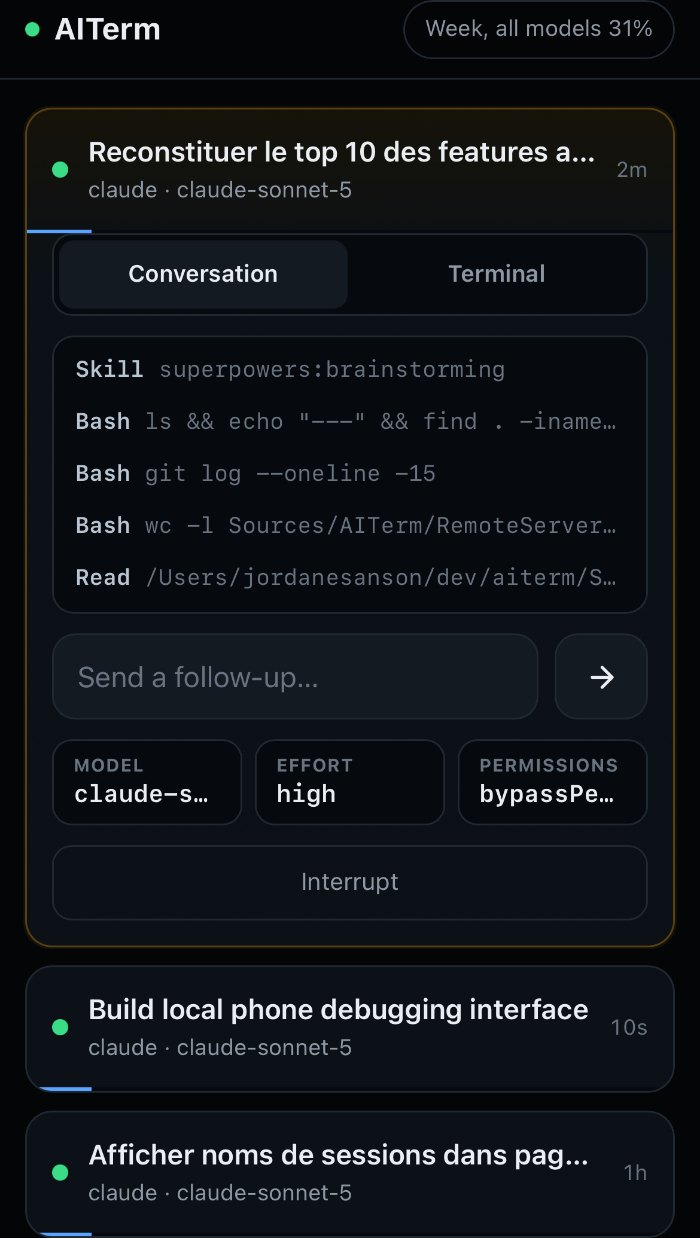
A few build decisions, all readable in the repo. The pairing link carries a 256-bit token, 43 characters, in the URL fragment, so the browser never sends it in a request line, a log or a Referer. That's also why the Mac shows a QR code: nobody types 43 characters on a phone keyboard. Updates come by long-poll with a 25-second timeout rather than server-sent events, and with no phone connected the server runs zero periodic timers, which matters on a laptop running on battery.
What we got wrong, or still trade off. Version one could only steer sessions that already existed. Starting a new agent from the phone took us until October 16, two months later. And the page is plain HTTP on your LAN: after pairing, the token rides in an Authorization header that anyone sniffing a shared café network could read. Use it on your home network, or reach the Mac through a VPN like Tailscale. Regenerating the token in settings cuts every paired device at once.
One small scar for the road. Our server takes the first free port between 8787 and 8791. Anthropic's fakechat demo channel also serves its chat UI on localhost:8787. Run both and ours quietly slides to 8788, which is exactly why the fallback exists.
If you only use Claude Code and you are happy with a relay, Anthropic's Remote Control is the simpler answer, and it is free with your plan. If your phone needs to see Codex and Claude side by side, or your code should not leave the building, that's the case we built for. Either way, the full Claude Code setup around it is in our guide to using Claude Code. Tell us what breaks: hello@aiterm.app.
Going further
Sources
- Continue local sessions from any device with Remote Control, Claude Code docs, read November 16, 2026: requirements, three start modes, server flags, push notifications, auto-connect, resume, connection and security, Trusted Devices, limitations, troubleshooting.
- Push events into a running session with channels, Claude Code docs: Telegram, Discord and iMessage plugins, Bun, events only while the session is open, permission relay, fakechat on localhost:8787.
- Anthropic launches remote control feature for Claude Code, Gigazine, February 25, 2026: research preview for Max users, Pro "coming soon", launch-time description of encryption.
- Claude Code Remote Control, Hacker News discussion of the launch: 544 points, 313 comments, reliability and relay criticism.
- Claude Code Remote not connecting (#30473), anthropics/claude-code on GitHub, opened March 3, 2026: WSL2 failure off the home network, native Windows binary works.
- Using Claude-Code on the go, Mansoor, August 23, 2025: SSH, tmux, Tailscale and Termius from a phone.
- Claude Code Remote Control (claude rc): Phone Setup Guide, NxCode, updated November 9, 2026.
- Settings reference, Claude Code docs:
remoteControlAtStartup,disableRemoteControl,dialogExpiry. - AITerm source code:
RemoteServer.swiftandRemoteProtocol.swift(token size and placement, long-poll timeout, ports 8787 to 8791), commits of August 8 and October 16, 2026.
Frequently asked questions
How do I use Claude Code Remote Control?
Sign in with a claude.ai account, then run /remote-control (or /rc) inside a running session, start a new one with claude --remote-control, or run claude remote-control for server mode. Open the URL Claude Code prints, scan its QR code with the Claude app, or pick the session in the Code tab of the app or at claude.ai/code.
Is Claude Code Remote Control free?
It costs nothing extra, but it needs a paid Claude subscription: Pro, Max, Ultra, Team or Enterprise. API keys are not supported, and on Team and Enterprise an Owner has to turn on the Remote Control toggle in the Claude Code admin settings first. Usage counts against your normal plan limits.
Can I use Claude Code Remote Control on Android?
Yes. The Claude app for Android and iOS both list Remote Control sessions in the Code tab, and any browser works through claude.ai/code. For push notifications on Android, exempt the Claude app from battery optimization, which Anthropic says can delay delivery.
Does Remote Control keep working when my laptop sleeps?
The session pauses with the machine and reconnects when it wakes up and gets back online. The claude process must keep running: closing the terminal takes the session offline. If the machine stays awake without network, an interactive session retries indefinitely, while server mode exits after roughly 10 minutes.
Why is Claude Code Remote Control not working?
The usual causes are an API key or token taking precedence over your claude.ai login, a gateway or Bedrock setup that bypasses api.anthropic.com, an environment variable that disables feature flags, or an organization policy. The exact error message names the cause. Run claude doctor to see which eligibility check failed.
Is Claude Code Remote Control secure?
Your machine only makes outbound HTTPS requests and opens no inbound port, and traffic goes through the Anthropic API over TLS with short-lived credentials. Code runs locally, but the session transcript is stored on Anthropic servers while Remote Control is connected. Trusted Devices adds a device check and an 18-hour sign-in limit.
Can I control several Claude Code sessions from my phone?
Yes, two ways. Each interactive claude process can register one remote session, so several terminals give several entries in the app. Or run claude remote-control in server mode, which hosts up to 32 concurrent sessions by default, with --spawn worktree to give each new session its own git worktree.