Six Claude Code Worktrees, Only Four Paid Off
Claude Code worktrees end to end: the native --worktree flag, .worktreeinclude, what six parallel sessions cost in RAM and quota, and how to spot the stuck one.
Claude Code worktrees are built in now, so you no longer create them by hand. Run claude --worktree feature-auth and it builds an isolated checkout under .claude/worktrees/, on its own branch, and starts the session there. Two agents, two directories, zero collisions. The ceiling you actually hit is not git. It is your usage window and your attention.
Updated August 21, 2026 · by the AITerm team
what six concurrent Claude Code sessions took on our M2 Air, before the terminal rendering them is counted
the rate ten parallel sessions burn your plan quota, per the Claude Code documentation
the number of agents we cap our own fleet at, after running six and counting what came back usable
Key takeaways
- You no longer need to write
git worktree addby hand. The--worktreeflag, subagent isolation and background-session isolation are all built in. - The file nobody mentions is
.worktreeinclude. Without it your worktrees have no.env, and the agent burns tokens rediscovering that on every single run. - Isolation is enforced, not advisory. Claude Code blocks edits, working directories and git redirects that reach back into the main checkout.
- Six sessions cost us about 3.6 GB and, more importantly, a 5 hour usage window we emptied by lunch.
- Launching agents is a solved problem. Knowing which one is blocked on a question is the actual job, and it is where every guide stops.
| Branch | Worktree | |
|---|---|---|
| Files on disk | One set, swapped in place | One set per worktree, side by side |
| Two agents at once | They overwrite each other | Physically impossible to collide |
| Switching cost | Stash, switch, rebuild, unstash | Change directory |
| Build artifacts | Shared, and invalidated constantly | Duplicated per worktree, disk cost |
| Untracked local config | Always there | Absent until .worktreeinclude |
| Right tool when | One worker, sequential tasks | Several workers, same repository |
What is a worktree in Claude Code?
A worktree is a second working directory of the same repository, checked out on its own branch, sharing one .git folder. Claude Code worktrees are that git primitive turned into a session flag. One command gives you an isolated checkout and a session already running inside it.
# one isolated session
claude --worktree feature-auth

# same thing, second terminal, second name
claude --worktree bug-1284

# no name, Claude Code picks one like bright-running-fox
claude --worktree
By default that lands at .claude/worktrees/feature-auth/ at your repository root, on a new branch named worktree-feature-auth. Add .claude/worktrees/ to your gitignore on day one, or your main checkout fills with untracked noise.
Here's the thing. The flag is the least interesting part. What makes this different from the git worktree add recipes every other guide reprints is that Claude Code enforces the isolation instead of trusting the agent to respect it.
While a session is in a worktree, four checks run on every tool call. An Edit, Write or NotebookEdit targeting a path in the main checkout is blocked. A shell command whose working directory resolves to the main checkout is blocked. A git command redirected into it through git -C, --git-dir, GIT_DIR or a cd is blocked. And a command whose shape cannot be traced without running it, such as a heredoc with an unquoted delimiter, is refused outright. That last check cannot be turned off.
So the agent does not politely stay in its lane. It is held there, and it sees each refusal as a tool error naming the worktree.
You're probably thinking tmux already does this. It does not. Tmux gives you four visible panes over one set of files, so four agents in four tmux panes will happily overwrite each other's edits in the same directory. Panes solve looking. Worktrees solve colliding. You want both, and they are not substitutes.
There are four routes into a worktree, and most people only know the first. The flag. The EnterWorktree tool, which Claude calls when you ask it mid-session to go work in a worktree. A custom subagent carrying isolation: worktree in its frontmatter, which then always gets its own. And background sessions, which move into one under .claude/worktrees/ before their first file edit unless you set worktree.bgIsolation to none.
When should you use a git worktree instead of a branch?
Branches switch state. Worktrees duplicate it. That single sentence answers the question in almost every case, and the practical test is simple: does more than one thing need a different version of the files on disk at the same moment?
For solo human work, no. You edit, you commit, you switch. A branch is correct and a worktree is overhead you will forget to clean up.
The moment a second worker appears, the answer flips. Two Claude Code sessions on one checkout is not a race condition you can be careful around: it is guaranteed corruption, because git switch in one session yanks the files out from under the other mid-edit. Turns out this is also the honest reason worktrees suddenly got popular in 2026 after a decade of near-total obscurity. Nobody needed a second checkout when there was only ever one pair of hands.
In practice, four situations earn a worktree on our repository. An agent working while you keep editing in your own editor. Two or more agents on independent tickets. A long build or test suite pinned to one branch while work continues on another. And a review checkout, where you want a pull request on disk without disturbing anything in progress.
Everything else, use a branch. Honestly, the most common mistake we see is not too few worktrees. It is a graveyard of fifteen stale ones from January, each holding a duplicated node_modules, quietly eating 400 MB apiece.
Opinion
Worktrees are not a productivity technique. They are a safety mechanism. If you adopt them expecting to go faster, you will be disappointed and you will blame the wrong thing. Adopt them so that going faster is possible, then go earn the speed somewhere else.
The setup that survives contact
Five steps. The first two take a minute, the third is the one everyone skips, and the last two are the ones you will thank yourself for in three weeks.
So, the honest framing before the list: none of this is hard, and all of it is the difference between worktrees feeling native and worktrees feeling like a hack you regret.
Ignore the worktree directory
Add .claude/worktrees/ to your gitignore before the first run, otherwise every worktree shows up as untracked files in your main checkout.
Accept trust once
Interactive runs need workspace trust. Run plain claude in the directory once to accept the dialog, or --worktree exits with an error telling you to.
Write .worktreeinclude
Gitignore syntax, at the project root. Every matching gitignored file gets copied into each new worktree. This is the step that decides whether the setup feels good or broken.
Pick your base branch
New worktrees branch from the remote default. Set worktree.baseRef to head when agents must build on your unpushed work instead of a clean main.
Teach the setup step
A worktree is a fresh checkout with no installed dependencies. Put the install and build commands in your project instructions so the agent runs them without being asked.
Step three deserves the code. Ours is four lines long and it removed an entire category of wasted agent turns:
# .worktreeinclude, gitignore syntax
.env
.env.local
config/secrets.json
.claude/settings.local.json
Only files that match a pattern and are gitignored get copied, so tracked files are never duplicated. One caveat worth knowing before you build tooling on it: if you replace worktree creation with a WorktreeCreate hook, for SVN or Perforce or anything non-git, .worktreeinclude is not processed at all. Copy the files inside your hook script instead.
Honestly, we shipped this file three weeks later than we should have. We spent those weeks watching agents fail on missing config, assumed the model was being careless, and only went looking for a mechanism once the same failure showed up in four unrelated sessions on the same afternoon.
For step four, the setting is two lines:
// .claude/settings.json
{
  "worktree": {
    "baseRef": "head"
  }
}
The default, fresh, branches from the remote default branch, and Claude Code keeps origin/HEAD current with a fetch capped at five seconds when the repository has not been fetched in the last 24 hours. Use head when you are isolating subagents that need your in-progress work. And yes, you can also branch straight from a pull request:
# quote the # so your shell does not eat it as a comment
claude --worktree "#1234"
# lands at .claude/worktrees/pr-1234
What six parallel agents cost your machine
Nobody publishes this number, so here is ours. Same M2 Air with 16 GB, same repository, cold start each time, one prompt of comparable size per session, measured at the point where every session was actively generating rather than idling.
The agent sessions themselves behave. Roughly 600 MB each, no superlinear blowup, and the machine stayed responsive at six. Keystroke latency in our panes stayed under 8 ms with all of them streaming at once, because the rendering is native CoreText rather than a browser engine per window.
Look, the honest headline is that RAM is not your problem. Six agents on a 16 GB laptop is fine. Disk is a slower, sneakier problem: six worktrees of a JavaScript project means six node_modules, and that arithmetic gets ugly faster than memory does.
The real bill arrives somewhere else entirely. The Claude Code documentation is blunt about it: background sessions consume quota the same as interactive ones, and ten parallel sessions burn it roughly ten times faster. Anthropic's published enterprise figures put average usage around 13 dollars per developer per active day, staying under 30 dollars for 90% of users. Six parallel sessions do not gently nudge you up that curve. They multiply it, and on a subscription plan you feel it as a 5 hour window that empties before lunch.
In practice, that reframes the whole exercise. You are not budgeting memory, you are budgeting a window, and a window refills on a clock you do not control.
There is a second, quieter multiplier. A long session sends its full conversation with every request, so parallel sessions each carry their own full history. Cache lifetime is one hour on a subscription and drops to five minutes once you are drawing on usage credits, which means an agent you left alone for ninety minutes reprocesses its entire context the moment you come back to it. Six idle-then-resumed sessions is six cache misses.
Launching them is easy, watching them is the job
Every guide on this topic ends at worktree creation. That is the easy half, and it is the half that was already solved. The hard half starts about four minutes later, when three parallel Claude Code sessions are running and you cannot remember which one asked you a question.
Claude Code ships an answer for this now, and it is underrated because it lives behind a separate command:
# dispatch without attaching a terminal
claude --bg --name "flaky-test-fix" "investigate the flaky SettingsChangeDetector test"

# one screen, every session, with state
claude agents

# everything currently blocked on you
# (type this in the agent view filter)
s:blocked
The agent view gives each session a state: working, needs input, idle, completed, failed, stopped. Press space on a row and a peek panel shows the exact question a blocked session is asking, plus how long it has been waiting, and you can answer without leaving the list. That s:blocked filter is the single most useful string in this whole article.
Sessions are hosted by a per-user supervisor process that survives updates and machine sleep, stores state under ~/.claude/jobs/, and stops idle non-pinned sessions after about an hour to free resources. Pin the ones you want kept alive with Ctrl+T. Worth knowing: the agent view is still labelled a research preview, so shortcuts may move.
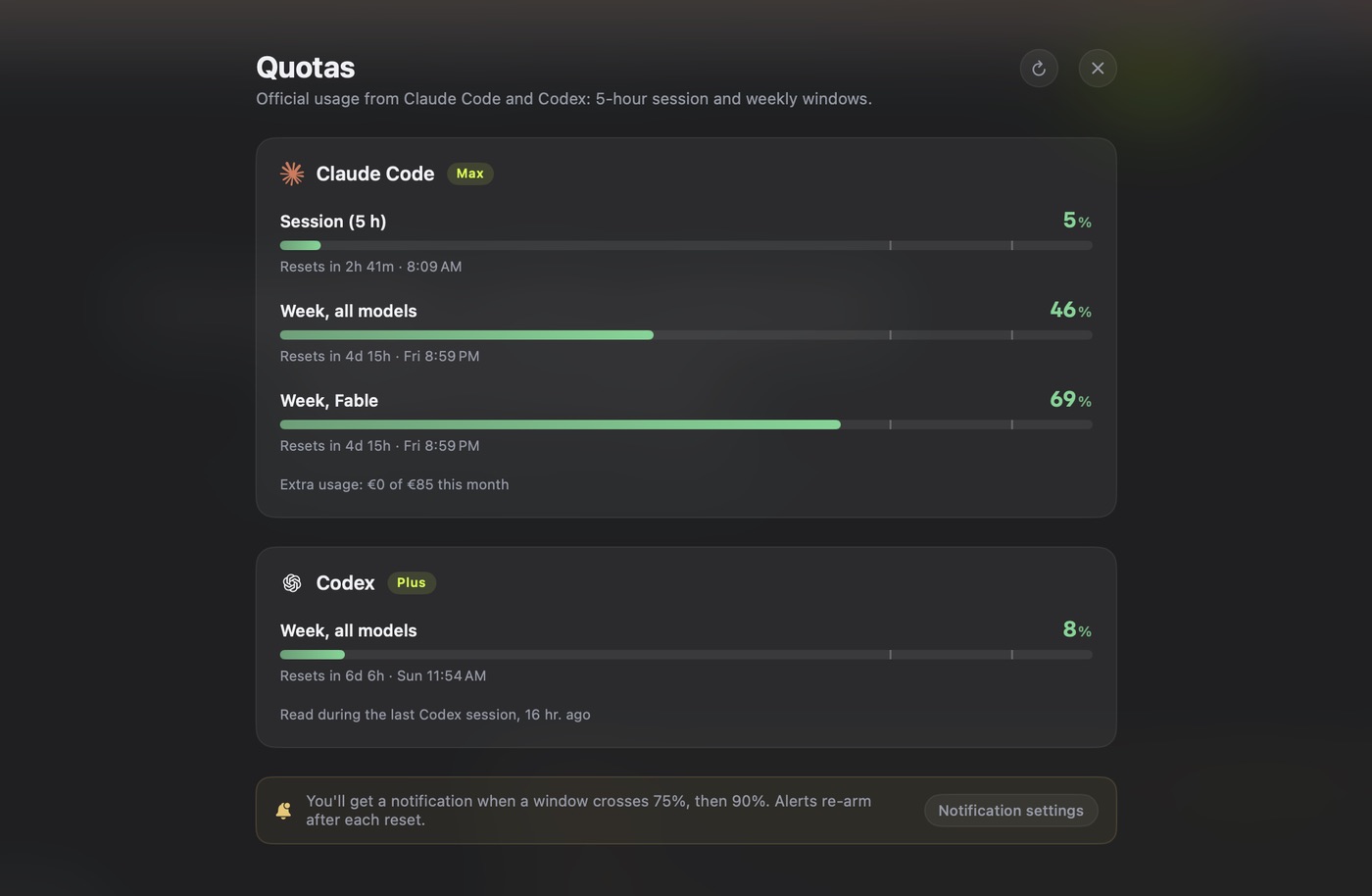
Fair question: if the tooling now surfaces state, why did we build a product around this? Because the state you need is not only per session. It is per provider, per project and per pane, and it has to be visible without a command. Our cockpit surfaces the same three answers on one screen, and we named them the way you actually think about them: needs attention, working, ready. Alongside them sit the live quota windows, the Claude Code 5 hour window and the Codex weekly one, with reset times, because the failure we hit most was not a stuck agent. It was four agents that all stopped at once when the window ran out and none of them said why.
Honestly, our first status detector was worse than nothing. It parsed the scrollback with regular expressions to guess whether a session was waiting, and it broke on the second Claude Code release that changed a prompt string. It reported agents as working while they sat blocked for twenty minutes. We deserved that one, and we rewrote it against process state instead of text.
How do you clean up worktrees without losing work?
Cleanup is where the lifecycle gets genuinely subtle, and it is the part the top-ranking guides skip entirely. The short version: interactive sessions clean up after themselves, everything else does not.
When you exit an interactive worktree session, Claude Code inspects the worktree for anything removal would destroy: changed files, untracked files, new commits. A clean unnamed session has its worktree and branch removed automatically. A clean named session asks first, so you can keep it. A worktree with work in it always prompts, and choosing to remove deletes the directory, the branch, and everything in them.
Non-interactive runs with -p have no exit prompt, so they clean up nothing and leave behind the lock Claude Code takes on each worktree at creation. Those get swept later. Subagent and background-session worktrees are swept once they are older than your cleanupPeriodDays setting, and the sweep skips anything still holding changed files, untracked files or unpushed commits. It never touches worktrees you made with --worktree yourself.
# what is actually on disk right now
git worktree list

# remove one the sweep is keeping
git worktree remove .claude/worktrees/feature-auth

# it refuses because of uncommitted work, and you accept the loss
git worktree remove --force .claude/worktrees/feature-auth

# git refuses because the worktree is locked
git worktree unlock .claude/worktrees/feature-auth
And yes, the sweep is conservative on purpose. It would rather leave you a directory to delete by hand than remove one holding an uncommitted fix you forgot about, which is the correct trade when the alternative is silent data loss.
Merging is the other half, and it is ordinary git. Each worktree is a branch, so you merge it like any branch. The friction is not mechanical, it is arithmetic: six agents produce six branches that all diverged from the same commit, and the conflicts between them are conflicts you resolve, sequentially, by hand.
Which brings us to the afternoon we would rather not describe.
What this cost us
Every user-facing string in AITerm goes through a helper and must exist in seven language files. We gave four agents four separate features in four worktrees, and all four correctly added their keys to the same seven files.
Four clean branches. Twenty-eight conflicting files. Roughly forty minutes of manual conflict resolution to recover maybe twelve minutes of parallel gain. The parallelism was real, the work was correct, and we still lost. Now we shard by file ownership before dispatching, and the localization files belong to exactly one agent per batch.
The traps that cost us the most
These are the ones we actually hit, ordered by how much time each one burned before we understood it. Look, none of them are exotic. They are all the same shape: a worktree is a fresh checkout, and your muscle memory assumes it is your checkout.
The missing environment. A worktree is a fresh checkout, so .env, local settings and anything else gitignored simply is not there. The agent does not fail cleanly, which is what makes it expensive: it investigates, hypothesizes, tries to reconstruct config, and burns real tokens before reporting something misleading. Fixed permanently by .worktreeinclude.
Dependencies nobody installed. Same root cause, different symptom. No node_modules, no virtualenv, no built artifacts. Either your project instructions tell the agent to run the install step, or every session starts with a confused agent. There is no automatic dependency copy, by design, because copying an installed tree between checkouts is how you get subtly broken native modules.
Hook paths that do not follow. This one is genuinely surprising. After Claude enters a worktree, the CLAUDE_PROJECT_DIR variable in your hooks still points at the original project root, so a hook script referenced by that path runs against the main checkout. The worktree path arrives through the cwd field in the hook's input JSON instead. If you have hooks that lint or format, read cwd, or they will quietly operate on the wrong files.
Launching from inside a worktree. Resume gets picky, for good reasons. Claude Code verifies a worktree is still a checkout separate from the main one before returning a session to it, and when you launch from inside a worktree it often cannot vouch for it and declines. Launch resumes from the main checkout. If you see a message starting with Refusing to use, the ending of that message names the specific fix, and it is not always "delete it": several endings mean the problem is your main checkout's git metadata, not the worktree's.
Assuming the other tools work the same way. Turns out they do not, and this is the tool-choice section of the article compressed into one table.
| Tool | Worktrees | What you do |
|---|---|---|
| Claude Code | Native, enforced | claude --worktree name |
| Cursor | Native, IDE-managed | Run parallel agents, the editor handles isolation |
| Codex CLI | No flag | git worktree add, then start a session in each |
| Anything else | Plain git | Same manual path, plus your own cleanup discipline |
A Cursor worktree you never think about, because the editor creates and reaps it for you. A Codex worktree you create yourself, because the gap is documented rather than assumed: the request for a codex --worktree flag was filed as issue 13120 on the openai/codex repository and closed as a duplicate. So if you pilot both agents, and we do daily, you are running two different parallelism models on the same machine. That asymmetry is a real cost, and it is one of the reasons we normalized session state at the terminal layer instead of per tool.
So how many agents are actually worth running?
Four. Sometimes three. Almost never six, and if someone shows you a screenshot of twenty, ask them how many of those diffs shipped.
We are aware how that sounds coming from a company that sells a tool for piloting agent fleets. It would be commercially convenient to tell you the number is twelve. It is not, and our own product caps the Maestro fleet at four for exactly this reason.
Three independent things converge on roughly the same ceiling, which is why we trust it.
Anthropic's own guidance for agent teams says to start with three to five teammates, and states plainly that three focused teammates often outperform five scattered ones, citing coordination overhead and diminishing returns. Their cost documentation adds the other half: agent teams use approximately seven times more tokens than a standard session when teammates run in plan mode.
Our anonymous daily ping tells the same story from the usage side. The median AITerm user runs about three simultaneous agent sessions. The tail above six exists, and it is thin, well under a tenth of sessions. People do not settle at three because they cannot count higher. They settle there because it is where the day still works.
And then there is the merge arithmetic, which is the part that actually bites. Conflict surface does not grow with the number of agents, it grows with the number of pairs of agents touching related files. Four agents is six pairs. Six agents is fifteen. That is the curve, and it is why our localization afternoon went the way it did.
So the real skill is not raising the number. It is shaping the work so the agents are genuinely independent: separate modules, separate files, separate test surfaces. Do that and four agents feel like four. Skip it and four agents feel like one agent and a merge queue.
The short version: Claude Code worktrees remove the collision problem completely, and then hand you a supervision problem and a review problem that no flag will solve. Set up .worktreeinclude, run three or four, keep s:blocked in reach, and shard by file before you dispatch. That's it.
Going further
GUIDE
Claude Code like a power user
The single-session fundamentals worth having before you run four at once.
COMPARISON
Cursor vs Claude Code
Why the harness decides more than the benchmark does.
CODEX
Codex skills that earn context
The other agent in the fleet, and how to keep its context small.
BENCHMARK
The best terminal for Mac
Measured latency and memory, which is the other half of this article.
PRODUCT
One screen, every session
Needs attention, working, ready, plus live provider quota windows.
MAESTRO
A fleet capped at four
Plan, route, isolate and gate the merge, with the ceiling built in.
Sources
- Run parallel sessions with worktrees, Claude Code documentation, 2026: the
--worktreeand-wflags, the.claude/worktrees/location andworktree-<name>branch naming, the four isolation checks, cleanup and prompt behavior,.worktreeinclude,worktree.baseRef, pull request worktrees, and the refusal messages on resume. - Common workflows, Claude Code documentation, 2026: running parallel sessions with worktrees, and the requirement that the repository have at least one commit.
- Agent view and background sessions, Claude Code documentation, 2026:
claude agents,claude --bg, the session states, the peek panel, thes:blockedfilter, the supervisor process, worktree-backed file isolation,worktree.bgIsolation, and the note that ten parallel sessions consume quota roughly ten times faster. - Orchestrate teams of Claude Code sessions, Claude Code documentation, 2026: the recommendation to start with three to five teammates, the statement that three focused teammates often outperform five scattered ones, and the coordination overhead and diminishing returns behind it.
- Manage costs effectively, Claude Code documentation, 2026: roughly 13 dollars per developer per active day with 90% under 30 dollars, agent teams at approximately seven times the tokens of a standard session in plan mode, and the one-hour prompt cache lifetime that drops to five minutes on usage credits.
- Subagents, Claude Code documentation, 2026: the
isolation: worktreefrontmatter field and how subagent worktrees are created and swept. - Hooks reference, Claude Code documentation, 2026: the
WorktreeCreateandWorktreeRemovehooks, and thecwdfield that carries the worktree path whenCLAUDE_PROJECT_DIRdoes not move. - Settings reference, Claude Code documentation, 2026: the worktree settings block and
cleanupPeriodDays, which governs the sweep of subagent and background-session worktrees. - Git worktrees with codex, openai/codex issue 13120: the request for a
codex --worktreeflag matching Claude Code, closed as a duplicate, confirming there is no native flag in the Codex CLI. - git-worktree, official Git documentation:
add,list,remove,lockandunlock, and the shared object store that makes a worktree different from a second clone. - Introducing Cursor 2.0 and Composer, Cursor, 2026: the parallel agent interface that Cursor backs with git worktrees.
- Claude Code desktop app, Claude Code documentation, 2026: every new session in the desktop app gets its own worktree automatically.
Frequently asked questions
What is a worktree in Claude Code?
A worktree is a second working directory of the same repository, on its own branch, sharing one .git folder. Claude Code creates them for you: run claude --worktree feature-auth and it makes an isolated checkout at .claude/worktrees/feature-auth on a new branch named worktree-feature-auth, then starts the session inside it. While the session is isolated, Claude Code blocks any edit, command working directory or git redirect that would reach back into your main checkout, so two agents running at once cannot overwrite each other's files.
How can I use git worktrees to run multiple Claude Code sessions in parallel?
Open a terminal, run claude --worktree api-refactor, then open a second terminal and run claude --worktree bug-1284. Each session gets its own directory and branch, so both can edit files at the same time without collision. If you omit the name, Claude Code generates one such as bright-running-fox. To watch several sessions from one screen instead of alt-tabbing between terminals, dispatch them with claude --bg and open claude agents, which lists every session with its state.
What is a worktree in git?
In git, a worktree is an additional checkout linked to an existing repository. git worktree add ../project-feature-a -b feature-a creates a new directory with feature-a checked out, while history, objects and remotes stay shared with the original clone. It is not a second clone: there is one .git directory, so a commit made in a worktree is immediately visible from the main checkout. git worktree list shows them all, and git worktree remove deletes one.
When should you use a git worktree instead of a branch?
Use a plain branch when only one thing edits the repository at a time, which is most solo human work. Use a worktree when two things need different file states on disk simultaneously: two agent sessions, an agent plus your own editor, or a long build running on one branch while you work on another. The rule of thumb is that branches switch state, worktrees duplicate it. Running two Claude Code sessions on the same checkout is exactly the case where a branch is not enough, because git switch would yank the files out from under the other session.
How does Claude Code use git worktrees?
Four ways. The --worktree flag starts a session in a fresh isolated checkout. Claude can create or enter one mid-session with the EnterWorktree tool when you ask it to work in a worktree. A custom subagent with isolation: worktree in its frontmatter always runs in its own. And background sessions move into a worktree under .claude/worktrees/ before their first file edit, which you can disable by setting worktree.bgIsolation to none.
How do I get my .env file into a Claude Code worktree?
Add a .worktreeinclude file at your project root. It uses gitignore syntax, and every pattern that matches a gitignored file is copied into each new worktree Claude Code creates with git. Listing .env, .env.local and config/secrets.json is enough for most projects. Only gitignored files are copied, so tracked files are never duplicated. This is the single fix that saves the most time, because a fresh checkout has none of your untracked local config and the agent will spend real tokens discovering that.
How many AI coding agents should I run in parallel?
Three to five, and closer to three than five. Anthropic's own guidance for agent teams is to start with three to five and notes that three focused teammates often outperform five scattered ones. Our measurement agrees: past four concurrent sessions, review and merge-conflict time grows faster than the work saved. The binding constraint is rarely your machine. It is your usage window, since ten parallel sessions burn quota roughly ten times faster, and your ability to review what comes back.
Do Codex and Cursor support worktrees too?
Not identically. Cursor 2.0 runs its parallel agents on git worktrees under the hood, handled by the IDE. Codex CLI has no --worktree flag: the request was filed as issue 13120 on openai/codex and closed as a duplicate, so parallel Codex work means creating worktrees yourself with git worktree add and starting a session in each directory. That manual path works fine, it just skips the cleanup prompts, the .worktreeinclude copy and the isolation checks that Claude Code applies automatically.