Claude Code Usage, Read It Before It Stops You
How Claude Code usage is metered on Pro, Max and Ultra, how to check it with /usage or your status line, and where your tokens really go.
Claude Code usage on a paid Claude plan is metered against two windows: a session limit that starts with your first message and resets five hours later, and a weekly limit shared with claude.ai, per Anthropic's help center in November 2026. Type /usage in any session to see both, with their reset times.
Updated November 9, 2026 · by the AITerm team
of the tokens our Claude Code jobs consumed in one week were cache reads. Prompts and replies were under 1%
how much a naive sum of transcript lines overstates usage, because one message is logged several times
session window on a verified Ultra account since October 30, 2026. The weekly cap stays
Key takeaways
- Two windows on Pro and Max: a 5 hour session and a weekly cap. Max and Ultra add a separate weekly limit for Fable.
- claude.ai chat, Claude Code, Desktop and the IDE extensions draw from one pool.
/usageis the source of truth./costand/statsare aliases, and the dollar figure in them is not your bill on a subscription.- Your status line script receives
rate_limits.five_hourandrate_limits.seven_day. Ten lines of bash keep them on screen. - Context you carry, not prompts you type, is what drains the window. Clear between tasks.
What does Claude Code usage actually count?
Claude Code usage counts the tokens each request sends and receives, weighted by model, and it counts all of them against one plan. Anthropic's help center lists conversation length, features used, the model and the effort level as the factors. Every request carries your full conversation, so a one line question late in a long session costs the whole history.
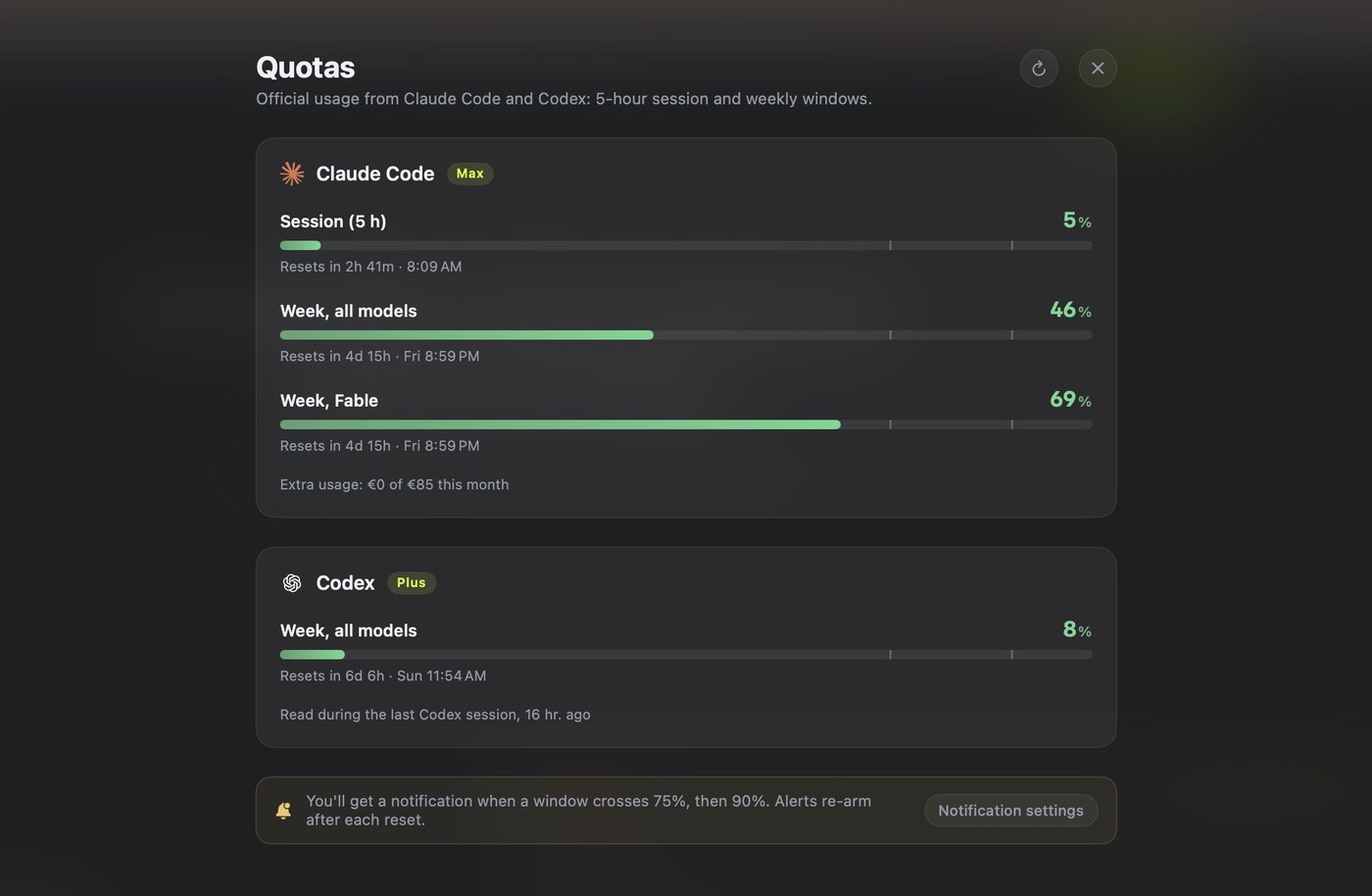
At AITerm, the native macOS terminal we build for piloting Claude Code and Codex agent sessions, we read Claude Code usage as two percentages with a reset time each: the 5 hour session and the week. Our quota panel shows them beside every agent session, plus the Fable weekly window when your plan has one. Everything else (tokens, cost, cache) explains why those percentages move.
Here's the thing. Anthropic does not publish limits as token counts. It publishes multiples: Max gives 5x Pro usage, Ultra 10x Pro usage per week. So "how many prompts do I get" has no honest answer. A rename across a monorepo with Opus at high effort is one prompt that costs what fifty short questions would.
Our take
Most advice about Claude Code limits is about writing shorter prompts. That advice is close to worthless. In our measurement below, everything we typed and everything Claude wrote back was under 1 percent of the tokens. The context you drag from turn to turn is the bill.
Claude Code usage limits by plan
Claude Code is included in every paid Claude plan and shares that plan's limits. Here is the grid as Anthropic's pricing page and help center describe it in November 2026, after Max 20x became Ultra on October 30.
| Plan | Price | Usage | 5 hour session | Weekly |
|---|---|---|---|---|
| Free | $0 | No Claude Code | n/a | n/a |
| Pro | $20 / mo, $17 annual | 1x | Yes, usually the first wall | All models |
| Max | $100 / mo | 5x Pro | Yes | All models, plus Fable |
| Ultra (ex Max 20x) | $200 / mo | 10x Pro per week | None once verified | All models, plus Fable |
| Team | $25 standard, $125 premium / seat | Premium is 5x standard | Yes, per seat | Per seat |
The session limit is often described as "rolling", and that is slightly off. Per the help center, the period starts with your first message and the limit resets in full five hours later. The weekly limit resets at a fixed time assigned to your account, whatever day you subscribed. So a teammate's reset day tells you nothing about yours.
And yes, the Fable line matters. Max and Ultra carry a separate weekly limit for Fable on top of the all models cap. You can be at 40 percent for the week and still be cut off on Fable. When the message names a model family, the docs say switching models with /model keeps you working. A session or weekly limit, on the other hand, covers every model, so switching does nothing.
One more wrinkle before you compare notes on Reddit. The Show HN thread that still ranks for this query dates from June 2025, when the plans were called Max x5 and Max x20 and nobody had a weekly cap to worry about. Anthropic ran a promotion from May 13 to September 13, 2026 that lifted weekly limits by 50 percent, then set them 25 percent above the old baseline for good. Most numbers you will read online predate at least one of those changes.
How do you check your Claude Code usage?
You check Claude Code usage with /usage inside any session: on a paid plan it shows the session and weekly bars with reset times, plus an attribution of recent usage to skills, subagents, plugins and MCP servers. Settings > Usage on claude.ai shows the same windows account wide. A status line script can keep the two percentages on screen permanently.
In AITerm, the native macOS terminal we build for running several Claude Code and Codex agents side by side, the 5 hour, weekly and Fable windows sit in a quota panel next to the sessions consuming them, with a macOS alert at 75 and then 90 percent. For one session in one terminal, the official surfaces below are enough.
/usage in the CLI
Plan bars, reset times, attribution and recommendations. Press d or w for 24 hours or 7 days. Works while Claude is answering.
Settings > Usage
claude.ai/settings/usage. The only view that includes chat and your other machines. Also where usage credits and spend limits live.
The status line
Your script gets rate_limits as JSON on stdin after the first response. Percentages always visible, zero commands typed.
/context and /insights
Not usage meters, but the why behind them. /context shows what fills the window. /insights writes a report on how you work.
# inside a Claude Code session
/usage          # plan bars, reset times, attribution (alias: /cost, /stats)
/status         # which account and plan this session is billed to
/context        # what is filling the context window right now
/rate-limit-options   # what to do once you are blocked

# outside a session, local history from your transcripts
npx ccusage@latest claude daily
Look, the dollar line at the top of /usage confuses everyone. The docs are explicit: the Session block computes a cost at API list price and is meant for API users. On Pro, Max or Ultra it is not what you pay. Read the bars underneath it instead.
The attribution block is the most useful thing Anthropic has added to it. Each recommendation row starts with the share of your recent usage it applies to, for example a CLAUDE.md that weighs 49k tokens per request. Since v2.1.305, pressing f applies the ones Claude Code can handle itself.
Put the limits in your status line
The status line is a shell command that receives session data as JSON on every update. For Pro, Max and Ultra subscribers, that JSON includes rate_limits.five_hour and rate_limits.seven_day, each with used_percentage and a resets_at epoch. Two minutes of setup and you never type /usage again.
# ~/.claude/settings.json
{
  "statusLine": { "type": "command", "command": "~/.claude/statusline.sh" }
}

# ~/.claude/statusline.sh  (chmod +x)
#!/bin/bash
input=$(cat)
model=$(echo "$input" | jq -r '.model.display_name')
five=$(echo "$input" | jq -r '.rate_limits.five_hour.used_percentage // empty')
week=$(echo "$input" | jq -r '.rate_limits.seven_day.used_percentage // empty')
ctx=$(echo "$input" | jq -r '.context_window.used_percentage // 0' | cut -d. -f1)
out="[$model] ctx ${ctx}%"
[ -n "$five" ] && out="$out | 5h $(printf '%.0f' "$five")%"
[ -n "$week" ] && out="$out | 7d $(printf '%.0f' "$week")%"
echo "$out"
The trap
rate_limits only appears after the first API response of the session, and each window can be absent on its own. Claude Code also drops a window once its resets_at has passed. Hence the // empty on every read: without it, your status line prints "null%" on a verified Ultra account, which has no 5 hour window at all.
Where do your Claude Code tokens actually go?
Most of your Claude Code tokens are cache reads: the conversation history re-sent with every request and served from Anthropic's prompt cache. In one week of our own sessions, cache reads were 95.5 percent of all tokens, cache writes 3.8 percent, Claude's output 0.7 percent and fresh input almost nothing.
The sample is the server that runs our scheduled Claude Code jobs: 61 transcripts from November 2 to 8, 2026, all on Opus 5.5, 1,285 assistant messages after deduplication. That is 142.4 million tokens. Turns out only 2,582 of them were fresh input. Everything else was context moving back and forth.
Token counts and cost tell different stories. Anthropic does not publish how each token type weighs on plan limits, so the public API price is the best proxy we have. At Opus 5.5 list prices, a cache read costs 5 percent of an input token and a 1 hour cache write costs twice one. Put both on the same chart and the picture flips.
So, three practical readings. First, output is a fifth of the cost while being under 1 percent of the tokens: high effort on a trivial task is expensive. Second, nearly half the cost is cache writes, which happen every time context is new to the cache, including after a break longer than the cache lifetime. Third, the long session itself is the meter. The docs say it plainly: a one line question in a session open all day still draws usage for the whole conversation.
Your mix will differ. Our jobs are long, tool heavy and unattended, which inflates cache traffic. Interactive work with frequent /clear should show more output and fewer cache writes. Run the command in the next section on your own transcripts before trusting our ratios.
Your token tracker may count everything twice
Claude Code writes its transcripts as JSONL under ~/.claude/projects/, one folder per project. When an assistant message has several content blocks (some thinking, a tool call, some text), each block gets its own line, and each line repeats the full usage object of the message. Sum the lines and you count the same message two, three, up to eight times.
On our week of transcripts, 2,869 assistant lines held 1,285 distinct messages. A naive sum put output at 2.40 million tokens instead of 1.02 million, and the API equivalent at $211.63 instead of $90.44. That is a 2.34x error, large enough to make anyone believe they are burning through Pro in a day.
# one usage object per message id, keeping the last line seen
cat ~/.claude/projects/*/*.jsonl \
  | jq -c 'select(.type=="assistant" and .message.usage)
           | {id: .message.id, u: .message.usage}' \
  | jq -s 'group_by(.id) | map(.[-1].u) | {
      messages:    length,
      output:      (map(.output_tokens) | add),
      cache_read:  (map(.cache_read_input_tokens // 0) | add),
      cache_write: (map(.cache_creation_input_tokens // 0) | add)
    }'
Keep the last line per message rather than the first. In our sample, 38 of the 981 messages logged more than once had lines with different counts. Taking the maximum and taking the last line gave exactly the same totals.
Honestly, we only caught this because our own Cost page had to get it right. AITerm prices a week of Claude Code, Codex and Gemini CLI sessions from the transcripts on your disk, and the parser keys every Claude usage block on its message id for exactly this reason. Subagent turns are counted too, since they are billed like any other request.
Claude Code usage trackers compared
Every tracker reads one of two things: the server's view of your plan windows, or your local transcripts. Only the first knows your real percentage. The second knows your history, your projects and an API equivalent cost. Pick by the question you are asking.
| Tool | Reads | Real plan % | Best for |
|---|---|---|---|
| /usage | Server windows + local attribution | Yes | Checking before a long run, finding what drains you |
| Settings > Usage | Server, whole account | Yes | Chat plus terminal plus other machines |
| Status line script | rate_limits from API responses | Yes, after the first reply | Always on screen, one session |
| ccusage | Local JSONL | No, estimates | Daily, weekly and per session history, MIT, many CLIs |
| Claude Code Usage Monitor | Local logs, plan presets | No, predicted | A live burn rate forecast in a spare terminal |
| AITerm Quotas | Same endpoint as /usage, plus Codex logs | Yes | Several agents and accounts at once, alerts |
You're probably thinking that /usage already covers this. For one agent, it does. With four sessions in four panes, nobody types /usage in each before starting a task, and the window you burn is shared by all of them. That is the gap our panel fills.
For the record, here is how it works. Outside a running session, the only source for your plan windows is the server, so AITerm asks the same usage endpoint /usage asks, with the token the CLI already stores in your Keychain. It calls at most every 5 minutes in the background, every 2 minutes with the panel open, and every 15 seconds when you click refresh.
Our mistake
The first version of the panel called that endpoint at launch, got a 429 straight away and displayed it as a parsing error. The endpoint is shared with the CLI and rate limited hard, so every extra call can cost you a refresh in /usage too. We fixed it on August 2, 2026: a back-off of 60 seconds, then 2, then 5 minutes that even a manual click cannot skip, and the last good reading cached on disk for 24 hours. If you script against it, be at least that polite.
Why is my Claude Code usage draining so fast?
Claude Code usage drains fast for five reasons, roughly in this order: a session that was never cleared, cache misses after a break, a heavy model at high effort, subagents and agent teams, and parallel sessions on one account. Anthropic's cost docs note that agent teams use about 7x more tokens than a standard session when teammates run in plan mode.
The session that never ends
Every request re-sends the whole history. A day old session makes every small question expensive. /clear costs nothing.
The coffee break
Come back after the cache lifetime and the first message re-processes your full context. That is the cache write half of our chart.
The model and the effort
Thinking is billed as output, and Opus 5.5 and Fable always think. /effort is the cheapest lever you have.
Subagents and teammates
Each one sends its own requests with its own context. A subagent that inherits Opus costs like Opus. Pin simple ones to Haiku.
Things running while you sleep
/loop tasks, goal check-ins and messages from other sessions start new turns with your full context, idle or not.
In practice, the fifth one surprises people most. A scheduled loop that fires every ten minutes on a session holding 150k tokens of history sends those 150k tokens every time. The /usage breakdown now lists the heaviest loops with their per run tokens, so check it before you blame the model.
Parallel sessions multiply all of this. Four Claude Code agents on one Pro account share one 5 hour window, and each carries its own context. If you run agents in parallel, read our guide to running multiple AI coding agents for how we stagger them, and the piece on Claude Code agent teams for what teammates cost.
What happens when you hit the Claude Code limit?
When you hit a Claude Code usage limit on a subscription, the session stops taking new work until the window resets, and since v2.1.234 it waits and continues the interrupted task on its own at the reset time. It does this up to three times in a row before handing control back to you with /rate-limit-options.
Usage limit reached · limit resets 3:45pm
Continuing automatically at 3:45pm · Esc to cancelLet it continue
Keep the session open. Permission prompts still apply, so allow what the task needs before you walk away.
Change model family
Only for a model limit, such as Opus or Fable. A session or weekly limit covers every model.
Usage credits
/usage-credits (formerly /extra-usage) opens the billing page. Set a monthly spend limit first.
Switch to a Console key
Billed per token at API rates, no plan windows. Useful for CI, dangerous if you forget the variable is set.
The help center adds a softer edge. Hit the 5 hour limit mid-response and Claude Code may finish the current step with "Usage limit reached · wrapping up". On Pro that allowance applies once per weekly period, on Max each time you reach a 5 hour limit. Anthropic says it is still rolling out.
Fair question: why does AITerm still have its own auto resume? We shipped it on August 8, 2026, when the CLI had nothing of the kind. It takes the later of the CLI's message and the known reset time, arms a single timer and gives up after three attempts. Claude Code now does the same thing natively and does it well. Ours stays useful because it covers Codex sessions from the same panel, and because several agents tend to hit the same wall at the same minute.
The API key trap deserves its own line. If ANTHROPIC_API_KEY is set in your shell, Claude Code bills that key instead of your subscription, per Anthropic's help center. A variable exported for another project is enough. Run /status before any long unattended job.
Ultra drops the 5 hour limit, not the weekly one
Ultra removes the 5 hour window for verified accounts, and it does not add weekly capacity. As MIXED points out, the "20x" in the old Max 20x name described the session window, while Anthropic's pricing page puts the Ultra week at 10x Pro. So Ultra buys you a different shape of week, with the same amount of Claude in it.
Our opinion, and people on Reddit will disagree: for one interactive session a day, Max at $100 is the better deal, because a human rarely saturates a 5 hour window at 5x Pro. Ultra starts paying when agents run in parallel or unattended for hours, which is exactly the kind of work that used to stop at the window boundary. From then on, the weekly bar is your only warning.
Before you upgrade, try the cheaper fix. Clear between tasks, move rarely used instructions from CLAUDE.md into skills, lower /effort on mechanical work and pin simple subagents to a smaller model. If your weekly bar still hits 100 percent twice in a month, the plan is the problem. Our Claude vs Claude Code guide covers what each plan includes beyond the terminal.
How we keep Claude Code inside its window
None of this is clever. It is what is left after months of running Claude Code agents next to Codex every day on the AITerm repo, where 282 of the 405 commits that touch the app's source are co-authored by Claude. Each habit targets one line of the chart above.
One task, one session
/rename, then /clear. You can /resume later. Cache reads stop growing with your afternoon.
Keep CLAUDE.md short
It rides along with every request. Anthropic suggests under 200 lines. Workflow specific rules belong in skills.
Effort follows the task
High effort for design, low for renames and test scaffolding. Output is under 1% of tokens and a fifth of the cost.
Start long runs at the top
A migration launched at 85 percent of the session gets cut, and the resume pays for the context again.
Make the window visible
Status line, a jq script, or a quota panel. A number you see is a number you manage.
If you also run Codex, the two tools meter very differently and a habit that works for one can hurt the other. Our Codex usage guide covers its windows, and Codex pricing what its credits cost. For the basics of the agent itself, start with how to use Claude Code.
The short version: read /usage before anything long, put the two percentages in your status line, and treat context as the thing you pay for. That's it. If you run our jq line on your own transcripts and get a very different mix, tell us: hello@aiterm.app.
Going further
PILLAR
How to use Claude Code
Install, CLAUDE.md, permissions and the daily loop this article assumes.
PLANS
Claude vs Claude Code
One subscription, two surfaces, one shared pool of usage.
CODEX
Codex usage limits explained
The other agent's windows, and how to read them from a file on your disk.
QUOTAS
Every window on one screen
Claude Code and Codex limits beside the sessions burning them, with alerts at 75 and 90 percent.
Sources
- Manage costs effectively, Claude Code docs, Anthropic, 2026:
/usageand its Session block at list price, the plan usage breakdown and thefshortcut (v2.1.305), the 13 dollars per developer per active day average, agent teams at about 7x tokens, why usage climbs in a long session, the API key and model limit cases. - Customize your status line, Claude Code docs, Anthropic, 2026: the
rate_limits.five_hourandrate_limits.seven_dayfields,used_percentage,resets_at, and when the object is absent. - Commands, Claude Code docs, Anthropic, 2026:
/costand/statsas aliases of/usage,/rate-limit-options,/usage-creditsformerly/extra-usage. - Interactive mode, wait for a usage limit to reset, Claude Code docs, Anthropic, 2026: automatic continue from v2.1.234, the messages shown and the stop after three continuations.
- Understanding usage and length limits, Claude Help Center, 2026: session limit reset five hours after the first message, weekly reset at a fixed time per account, the Fable weekly limit, shared usage across claude.ai, Claude Code and Desktop, verified Ultra accounts without a five hour limit.
- Using Claude Code with your Pro or Max plan, Claude Help Center, 2026: limits shared across Claude and Claude Code, the wrap-up allowance, usage credits, and
ANTHROPIC_API_KEYtaking precedence over the subscription. - Claude pricing, Anthropic, November 2026: Pro at $20 or $17 annual, Max at $100 with 5x Pro usage, Ultra at $200 with 10x Pro usage every week, Team seats.
- Pricing, Claude API docs, Anthropic, 2026: Opus 5.5 at $4 input, $20 output, $8 for 1 hour cache writes and $0.20 for cache hits per million tokens.
- Claude's $200 Ultra plan changes how long verified users can work, MIXED, November 1, 2026: Max 20x renamed Ultra after the October 30 announcement, automatic verification, weekly cap at ten times Pro.
- Claude Code weekly limits promotion, Claude Help Center, 2026: weekly limits 50 percent higher from May 13 to September 13, 2026, then 25 percent above the previous baseline.
- ccusage guide, ryoppippi, 2026: the MIT licensed CLI that reads local Claude Code transcripts, its daily, weekly, monthly and session reports, and the warning that costs are estimates.
- Show HN: Claude Code Usage Monitor, Hacker News, June 19, 2025: the real time tracker with Pro, Max x5 and Max x20 presets, and the thread on how opaque the limits felt.
Frequently asked questions
How do I check my Claude Code usage?
Type /usage inside a Claude Code session. On a Pro, Max, Ultra, Team or Enterprise plan it shows your plan usage bars with reset times, plus a breakdown of what consumed them. /cost and /stats are aliases of the same screen. Outside the terminal, Settings > Usage on claude.ai shows the same windows, including usage from chat and other devices. For a number that stays on screen, read rate_limits in a status line script.
What are the Claude Code usage limits?
Paid plans have a session limit that starts with your first message and resets in full five hours later, plus a weekly limit that resets at a fixed time assigned to your account. Max and Ultra also carry a separate weekly limit for Fable. Anthropic publishes multiples rather than token counts: Max is 5x Pro usage and Ultra is 10x Pro usage per week. Since October 30, 2026, verified Ultra accounts have no five hour limit.
Does Claude Code share usage limits with claude.ai?
Yes. Anthropic's help center states that usage across claude.ai, Claude Code and Claude Desktop counts toward the same limits, and IDE usage counts too. A long research chat in the morning leaves less room for your agent in the afternoon. The /usage screen in the terminal only attributes usage from the current machine, so check Settings > Usage on claude.ai for the full picture.
Is /cost the same as /usage in Claude Code?
Yes, /cost is now an alias for /usage, and so is /stats. The dollar figure in the Session block is computed locally at API list price and is meant for API users. On a subscription it is not what you pay. What matters on Pro, Max or Ultra is the plan usage bars on the same screen, and the attribution of recent usage to skills, subagents, plugins and MCP servers.
What happens when you hit the Claude Code usage limit?
Since Claude Code v2.1.234, an interactive session signed in with a subscription waits and continues the interrupted task on its own once the limit resets, up to three automatic continuations. You can also run /rate-limit-options to wait, add usage credits or upgrade. If the message names a model family, such as an Opus limit, switching to another model with /model keeps you working.
Does Claude Code with an API key use my plan limits?
No. If the ANTHROPIC_API_KEY environment variable is set, Claude Code uses that key instead of your subscription and bills usage at API rates. That is the most common cause of a surprise invoice from a user who thought they were on Pro. Run /status to see which account the session is using before a long job.
How much does Claude Code cost per day?
On the API, Anthropic reports an average of around 13 dollars per developer per active day across enterprise deployments, 150 to 250 dollars per developer per month, and under 30 dollars per active day for 90 percent of users. On a subscription the price is fixed, from 20 dollars a month for Pro to 200 for Ultra, and the real question becomes how much of your windows a day of work consumes.