Codex Usage Limits Explained Before You Hit Them
Codex usage limits per plan and model, every way to check what is left (even from a file on your disk), what drains it fastest and what to do at the wall.
Codex usage is metered per ChatGPT plan, not per message count you can memorise. Plus gets an estimated 15 to 160 local messages per 5 hour window on GPT-6.1 Sol, Pro currently has no 5 hour window, and a weekly limit may apply to everyone, per OpenAI's pricing page in October 2026.
Updated October 16, 2026 · by the AITerm team
local messages per 5 hour window on GPT-6 Astra for a Plus seat, the tightest model on the grid
how fast Ultrafast mode burns your included usage compared with Standard. Fast mode is 2.5x
commands you need to type to read your limits: the CLI already writes them to a file on your disk
Key takeaways
- Codex limits are ranges per model, not one number per plan. Your model choice moves the ceiling by two orders of magnitude.
- Plus and standard Business have a rolling 5 hour window. Pro has none for now. A weekly cap may sit on top of both.
- Local messages, cloud tasks and desktop voice all draw from one pool.
- The CLI logs a
rate_limitssnapshot in~/.codex/sessions. Onejqline reads it. - Hitting the wall mid-turn is fine: the turn finishes. The next instruction is the one that gets refused.
What does Codex usage actually measure?
Codex usage measures the work the agent does inside your ChatGPT plan's allowance, not the number of prompts you type. OpenAI lists model choice, context, reasoning, tool use, retrieval and caching as the factors, and says plainly that prompt length alone is not a reliable estimate. Two prompts of the same size can cost ten times apart.
At AITerm, a native macOS terminal for piloting Claude Code and Codex agent sessions, we read Codex usage the way the CLI reports it: two windows, each with a percentage used and a reset time. The short one is the 5 hour session window on plans that have it. The long one is the weekly window. Everything else (credits, messages, tokens) is a way of explaining why those two percentages move.
Here's the thing. Since April 2026 Codex counts tokens rather than messages, so the "messages per window" numbers OpenAI publishes are estimates derived from typical tasks. A long running refactor in a large repo with high reasoning effort is one "message" that eats what twenty short questions would. Your mileage will vary, and the published ranges are wide for exactly that reason.
Our take
Stop asking "how many messages do I get". The honest answer is a range that spans a factor of ten on a single model. Ask what percentage of the window your typical task burns, measure it twice with /status, and plan from that.
Codex usage limits by plan
OpenAI publishes limits as estimated local messages per 5 hour window, per model, and only for Plus and standard Business seats, which share identical numbers. Pro, Enterprise and Edu are described in words instead. Here is the grid as it reads on OpenAI's pricing page in October 2026.
| Plan | Price | 5 hour window | What runs out first |
|---|---|---|---|
| Free, Go | $0, $8 / mo | No number published | GPT-6 Luna at Standard speed in the desktop app, subject to rollout |
| Plus | $20 / mo | Yes | The 5 hour window, usually within one heavy session |
| Business (standard) | $20 / user annual, $25 monthly | Yes, same as Plus | The 5 hour window, per seat |
| Pro | $100, $200 or $500 / mo | None for now | The weekly limit, if it applies to you |
| Enterprise, Edu | Contact sales | Plus limits, or none with flexible pricing | Workspace credits |
The per model ranges are where it gets interesting. On a Plus seat, GPT-6 Astra is estimated at 5 to 45 local messages per window, GPT-6.1 Sol at 15 to 160, GPT-6 Sol at 15 to 150 and GPT-6 Luna at 350 to 3,000. Put those on one axis and the lesson is obvious.
Turns out the most effective limit increase on a Plus seat costs nothing. Routing the routine work (renames, test scaffolding, dependency bumps) to Luna and saving Astra for the hard problems moves your ceiling far more than any plan change would. The credit rate card says the same thing: Astra output is billed at 1,250 credits per million tokens, Luna at 12.5. That is a factor of 100.
And yes, the Pro line deserves a footnote. Pro 200 reopened to new subscribers on September 30, 2026, and by the account of OpenAI's Codex lead, its included usage is about half of what the old 200 dollar tier carried, still without a 5 hour window. If you are comparing plans, our Codex pricing breakdown covers what each tier costs once credits are added.
How do you check your Codex usage?
You check Codex usage in one of four places, and each answers a different question. The dashboard at chatgpt.com/codex/settings/usage gives limits and reset times. /status gives live percentages in a CLI session. /usage gives token history. The ChatGPT desktop app gives a monthly view across Work and Codex.
In AITerm, the native macOS terminal we build for piloting Claude Code and Codex, we skip all four for day to day work. The app reads the rate limit snapshot the Codex CLI already writes to ~/.codex/sessions and shows the 5 hour and weekly windows beside each agent session, with an alert at 75 and 90 percent. The official surfaces stay useful for the questions below.
The usage dashboard
chatgpt.com/codex/settings/usage. Current limits and when each resets. It is also where banked resets show up. OpenAI suggests checking it every week or two.
/status in the CLI
Percentage used and reset time for each window, plus model and context. Only works inside an open session, which is exactly when you need it.
/usage for history
Added in CLI 0.140.0. Daily, weekly and cumulative token activity, with a 52 week grid. Tells you how much you work, not how much window is left.
ChatGPT desktop
Usage and billing shows monthly limits and history across Work and Codex, with per chat details where available. The view for Free and Go users.
# inside a Codex CLI session
/status              # % used and reset time, per window
/usage               # 52 week activity grid
/usage daily
/usage weekly
/usage cumulative

# outside a session, local history from your logs
npx ccusage@latest codex daily
Look, the one people get wrong is platform.openai.com/usage. That page tracks API spend on your developer account. It says nothing about your ChatGPT plan's Codex windows, and SessionWatcher's guide makes the same point: it is not a substitute for the Codex usage page.
The status line is worth two minutes of setup. Codex's tui.status_line setting accepts a fixed list of built in items, and two of them are five-hour-limit and weekly-limit. Add them and the percentages sit in your prompt footer while you work.
# ~/.codex/config.toml
[tui]
status_line = ["model-with-reasoning", "context-used", "five-hour-limit", "weekly-limit"]
Read your limits straight from disk
Every Codex CLI session writes a JSONL rollout under ~/.codex/sessions/YYYY/MM/DD/, and the CLI records the server's rate_limits block in it as you work. That block holds everything the dashboard shows you: used percentage, window length and reset timestamp for each window, plus your plan type. One jq line reads it.
# newest Codex session log
f=$(ls -t ~/.codex/sessions/*/*/*/*.jsonl | head -1)

# last rate limit snapshot the server sent
grep '"rate_limits"' "$f" | tail -1 | jq '.payload.rate_limits'

# when does the weekly window reset, in local time
grep '"rate_limits"' "$f" | tail -1 \
  | jq -r '.payload.rate_limits.secondary.resets_at | localtime | strftime("%a %d %b %H:%M")'
What you get back is a primary and a secondary object, each with used_percent, window_minutes and resets_at, plus plan_type. On a Plus seat, the 5 hour window should report 300 minutes.
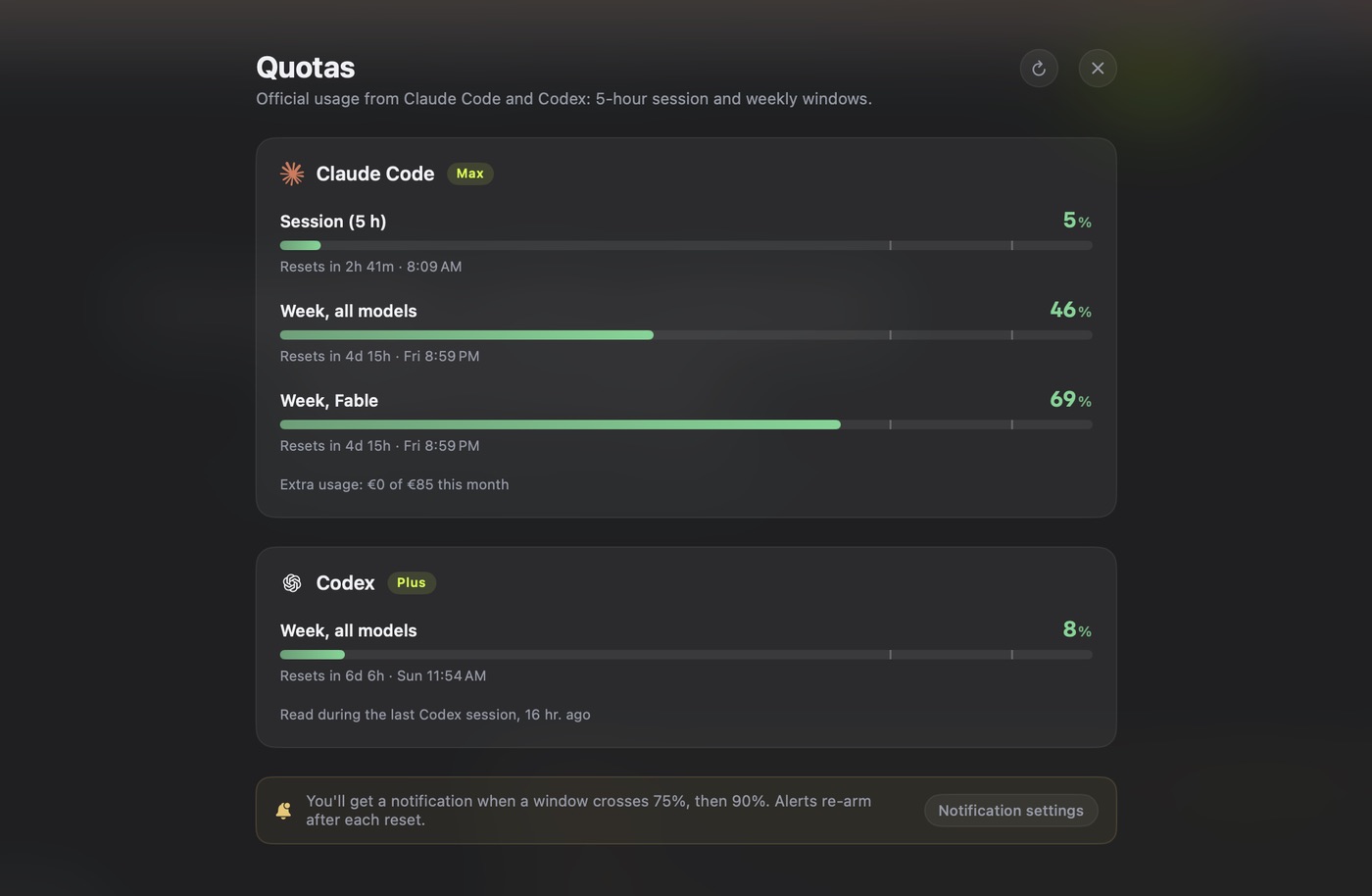
We know how that sounds: why parse a log when /status exists? Because a file can be read by a script, a status bar, a cron job or a terminal app without anyone opening a session. That is exactly what our quota panel does. It parses the last rate_limits block of your most recent rollouts and turns it into two gauges.
The trap
The snapshot is only as fresh as your last Codex turn. If resets_at is already in the past, the percentage is wrong: the window has reopened since. And on a plan without a 5 hour window, do not assume primary is the short one. Classify each window by window_minutes, which is what our parser does.
Honestly, we built the panel this way on purpose. The two other options were scraping the TUI output, which breaks on every CLI release, or calling an undocumented endpoint with your session token, which we were not willing to ship. The file is local, it is already there, and reading it costs nothing.
The 5 hour window and the weekly cap
Codex has a rolling 5 hour window on Plus and standard Business, and Pro currently has none. The window is rolling rather than clock based: usage frees up five hours after it was spent. A weekly limit may also apply on any plan, and OpenAI does not publish a figure for it, only the footnote saying it exists.
At AITerm we treat the weekly window as the real budget for anyone on Pro, because it is the only one left. The quota panel in our native macOS terminal shows both windows for every Codex account it sees, and on Pro the weekly gauge is the only one that moves. A Pro seat without a 5 hour window does not mean unlimited. It means the week is your only warning.
The history explains most of the confusion you will read online. OpenAI temporarily removed the 5 hour limit for Plus, Business and Pro on July 12, 2026. A staff reply in the OpenAI forum then announced it would come back on July 30, and two days later said that was postponed. It returned for Plus on August 25, 2026, while Pro kept going without it.
Our mistake
Our own pricing guide said the window came back on July 30. We took the announcement at face value and did not check the follow up. It did not come back then, and we have corrected it. If a Codex limits article gives you a date without a source, assume it is wrong until you see the thread.
In practice, the weekly window is the one that hurts more, because it does not forgive. Burn the 5 hour window by noon and you lose an afternoon. Burn the weekly one by Wednesday and you lose the week, unless you buy credits or hold a banked reset.
The weekly reset date is tied to your account rather than a global Monday, and a banked reset can move it. So a teammate's reset day tells you nothing about yours. Read secondary.resets_at from your own rollout or check the dashboard.
Why is my Codex usage draining so fast?
Codex usage drains fast for four reasons, in this order: a heavy model, a speed mode, cloud tasks you forgot share the pool, and parallel sessions. OpenAI's pricing page lists the multipliers: Fast mode consumes included usage at 2.5x Standard and Ultrafast at 8x. Image generation runs about 3 to 5x faster than a comparable text turn.
| What you turned on | On included usage | On purchased credits |
|---|---|---|
| Standard speed | 1x | 1x |
| Fast mode | 2.5x | 2x |
| Ultrafast (Astra, 6.1 Sol) | 8x | 6x |
| Image generation | About 3 to 5x a text turn | Credits once included usage is gone |
| Desktop voice | $0.05 per minute of budget | 1.25 credits per minute |
So, if you flipped Fast mode on once and forgot about it, that alone cuts your window to 40 percent of what it was. Ultrafast is available on Pro 500 and eligible Enterprise or Edu plans, and at 8x it should be reserved for the moment a human is blocked waiting on the answer.
The cloud is the quiet one. Local messages and cloud chats share the same allowance, and OpenAI notes that cloud tasks may use more of it than local messages. Firing three long cloud tasks and then carrying on locally feels like parallelism. It is one pool, drained from two ends.
Parallel sessions finish the job. The median in our anonymous daily ping is three simultaneous agent sessions per user, and every one of those sessions draws on the same account windows. Three Codex agents on Astra in Fast mode on a Plus seat is a plan to be stopped before lunch.
What happens when you hit the Codex limit?
When you hit the Codex limit mid-turn, the agent is allowed to finish that turn, subject to fair use, and your next instruction is refused until the window reopens. Nothing is lost. The work in progress completes, the session stays open, and you choose between waiting, paying for more or spending a reset.
Let the window roll
Free, and often shorter than you think on a rolling window. Read the reset time first.
Drop to Luna before the wall
At 90 percent, the last tenth of a window goes about 100 times further on Luna than on Astra, per output token.
Buy credits or use an API key
Plus and Pro can buy credits without upgrading. Anyone can run local chats with an API key at API rates.
Redeem a banked reset
A full one refreshes both windows and moves your weekly reset date. Expires 30 days after it lands.
Banked resets deserve a closer look because most people never notice they have one. OpenAI describes them as one time resets that sit on your account until used or expired, granted through promotions such as referrals. You redeem them from Settings, then Usage. Linux CLI users have reported in the OpenAI forum that the reset is hard to find outside the desktop app and the web.
The other option is to let a machine do the waiting. AITerm resumes a Codex or Claude Code session that stopped on its usage limit as soon as the window reopens. It takes the later of the CLI's own message and the known reset time, because resuming too early wastes an attempt while resuming late only costs a few minutes. A single timer arms the restart, nothing polls while it waits, and it gives up after three attempts. Blocked at 2am, finished by breakfast.
Codex rate limits are not API rate limits
"Codex rate limits" gets used for two different things, and the fix depends on which one you are hitting. On a ChatGPT plan, the limit is your plan's usage window. With an API key, it is your organisation's API rate limit and token spend, billed at API prices, and cloud features are not included.
The quick test is where you signed in. If codex login went through ChatGPT, your ceiling is the window on the dashboard and /status. If you exported an API key, look at platform.openai.com/usage, and buying ChatGPT credits will not move anything.
Here is the pattern we recommend: ChatGPT sign in for interactive sessions, an API key for headless codex exec jobs in CI. The two budgets stop competing, and a nightly batch can no longer starve your morning session. It costs a little more in API spend. We think it is worth it for anything scheduled.
Pro buys you a missing window, not more speed
Our opinion, and plenty of people on Reddit will disagree: most single session Plus users who want Pro for the limits should first fix their model routing. If your work is one agent, one repo, mostly mechanical, Luna and Sol at Standard speed will carry a Plus seat further than an upgrade carries a careless setup.
Pro starts making sense at two concurrent sessions or more, or when your work genuinely needs Astra all afternoon. That is when the missing 5 hour window stops being a nice to have and becomes the thing that keeps an agent alive between 2pm and 6pm. Fair question: what about the weekly cap on Pro? OpenAI says one may apply and publishes no number. Plan as if it exists.
If you run Codex next to Claude Code, compare windows rather than prices: the two tools meter very differently, and our Codex vs Claude Code comparison covers how we split work between them. For the agent itself, the Codex CLI guide covers config, approval modes and AGENTS.md.
How we keep Codex inside its window
None of these are clever. They are what is left after a few months of running Codex agents next to Claude Code every day on the AITerm repo, and each one targets a specific line of the rate card above.
Pick the model per task
Luna for mechanical edits, Sol for normal work, Astra only when you would have asked a senior colleague. The ceiling moves 100x.
Leave Fast mode off by default
Turn it on when you are blocked, off when you are not. At 2.5x, a forgotten toggle is the costliest setting in the CLI.
Start long runs at the top
A migration launched at 80 percent gets cut, and the restart pays for the context again. Check the window first.
Count cloud tasks as local
Same pool. Before you delegate, ask whether you can afford it from the window you are already watching.
Make the window visible
Status line items, a jq script in your prompt, or a quota panel. A number you see is a number you manage.
When we run several agents at once, we stagger them rather than launch them together: the heavy task first at the top of a window, a review session behind it, and the next ticket queued. Our guide to running multiple AI coding agents covers the worktree side of that setup.
The short version: know which window you are on, read it without leaving your terminal, and route work by model before you pay for more. That's it. If you try the jq trick and the field names have moved in your CLI version, tell us what breaks: hello@aiterm.app.
Going further
PILLAR
The Codex CLI guide
Install, approval modes, config.toml and AGENTS.md, the setup this article assumes.
PRICING
Codex pricing is not the $20 you think
The plan grid, what a credit costs and what a month of Codex billed us per shipped change.
COMPARISON
Codex vs Claude Code
Two agents, two metering models, and how we split the work between them.
QUOTAS
Every window on one screen
Codex and Claude Code limits beside the sessions burning them, with alerts at 75 and 90 percent.
Sources
- Codex pricing, OpenAI, 2026: plans from Free to Pro 500, estimated local messages per 5 hour window per model for Plus and standard Business, "Pro plans currently have no five-hour limit", weekly limits footnote, speed multipliers, credit rates per million tokens, voice cost, behaviour at the limit and the usage dashboard URL.
- Reviewing Work and Codex usage in ChatGPT desktop, OpenAI Help Center, 2026: the Usage and billing page with monthly limits and usage history across Work and Codex.
- How banked Codex resets work, OpenAI Help Center, 2026: one time resets kept until used or expired, redemption from Settings then Usage, and the effect of a full reset on the 5 hour and weekly windows.
- Has the 5-hour usage session been removed from Codex CLI?, OpenAI Developer Community, 2026: the July 12 lift confirmed by OpenAI support, the restoration announced for July 30 and then postponed.
- OpenAI reinstates the five-hour limit for Codex on Plus, Mezha, August 25, 2026: the return of the window for Plus while Pro tiers stayed without it.
- OpenAI removed Codex's 5-hour limit: what actually changed, eesel AI, 2026: the July 12, 2026 announcement by the Codex lead covering Plus, Business and Pro, with the weekly limit left in place.
- Check token usage from the terminal with /usage, DevelopersIO, 2026: the
/usagecommand added in Codex CLI 0.140.0 and its daily, weekly and cumulative views. - Command-backed statusline in Codex CLI, openai/codex issue 20140, 2026:
tui.status_lineand its built in items, includingfive-hour-limitandweekly-limit. - ccusage, Codex guide, ryoppippi, 2026: the MIT licensed CLI that reads
~/.codex/sessions, its daily, monthly and session reports, and the note that its cost is an API equivalent estimate rather than a credit balance. - How to check your Codex usage and rate limits, SessionWatcher, 2026: why
platform.openai.com/usageis not a substitute for the Codex usage page, and the August 25 restoration for Plus. - OpenAI announces Pro $200 is back, 2026: the September 30, 2026 reopening of Pro 200 with about half the previous API equivalent allowance and no 5 hour window.
- Where to find Codex usage limits?, r/OpenAI, 2026: the thread that ranks on this query, and the confusion about where the numbers went.
Frequently asked questions
How do I check my Codex usage?
Three official places. The usage dashboard at chatgpt.com/codex/settings/usage shows your current limits and when each one resets. Inside a Codex CLI session, /status shows the percentage of your windows already used. Since CLI 0.140.0, /usage shows your token activity by day, week or in total. If you want a number without opening anything, the CLI also writes a rate_limits snapshot into the session logs under ~/.codex/sessions, which you can read with jq.
Does Codex have a 5-hour usage limit?
On Plus and standard Business seats, yes. OpenAI estimates a range of local messages per five hour window for each model, for example 15 to 160 on GPT-6.1 Sol. OpenAI lifted that window on July 12, 2026 and brought it back for Plus on August 25, 2026. As of October 2026, OpenAI's pricing page says Pro plans currently have no five hour limit. A weekly limit may apply on every plan.
What happens when you hit the Codex usage limit?
If you hit the limit in the middle of a turn, the agent is allowed to finish that turn, subject to fair use. Your next instruction is refused until the window reopens. From there you can wait for the reset, switch to a lighter model, buy extra credits on Plus or Pro, redeem a banked reset if you have one, or run local chats with an API key at standard API rates.
When do Codex usage limits reset?
The five hour window is rolling: usage frees up five hours after it was consumed, not at a fixed clock time. The weekly limit resets on a weekly date tied to your account, which OpenAI does not publish as a single number for everyone. The exact reset timestamps appear on the usage dashboard, in /status, and in the resets_at field of the rate_limits block that the CLI writes to your session logs.
Do Codex cloud tasks count toward my usage?
Yes. Local messages and cloud chats share the same allowance, and OpenAI's pricing page notes that cloud tasks may use more of it than local messages. Desktop voice also draws from the Codex budget, at 0.05 dollars per minute. Delegating work to the cloud does not give you a second pool, which is the single most common reason people hit a limit they did not expect.
Is Codex usage the same as OpenAI API usage?
No. Codex usage on a ChatGPT plan is measured in plan windows and credits, and you check it at chatgpt.com/codex/settings/usage. API usage is billed per token on your platform account and shows up at platform.openai.com/usage. The two only meet when you sign the Codex CLI in with an API key, in which case you pay API prices and cloud features are not included.
Can you see Codex usage in the ChatGPT app?
Yes. In the ChatGPT desktop app, the Usage and billing page shows monthly limits and usage history across Work and Codex, plus details on high usage chats where they are available locally. For the precise five hour and weekly reset times, the Codex usage dashboard and the /status command in the CLI remain the most direct readouts.